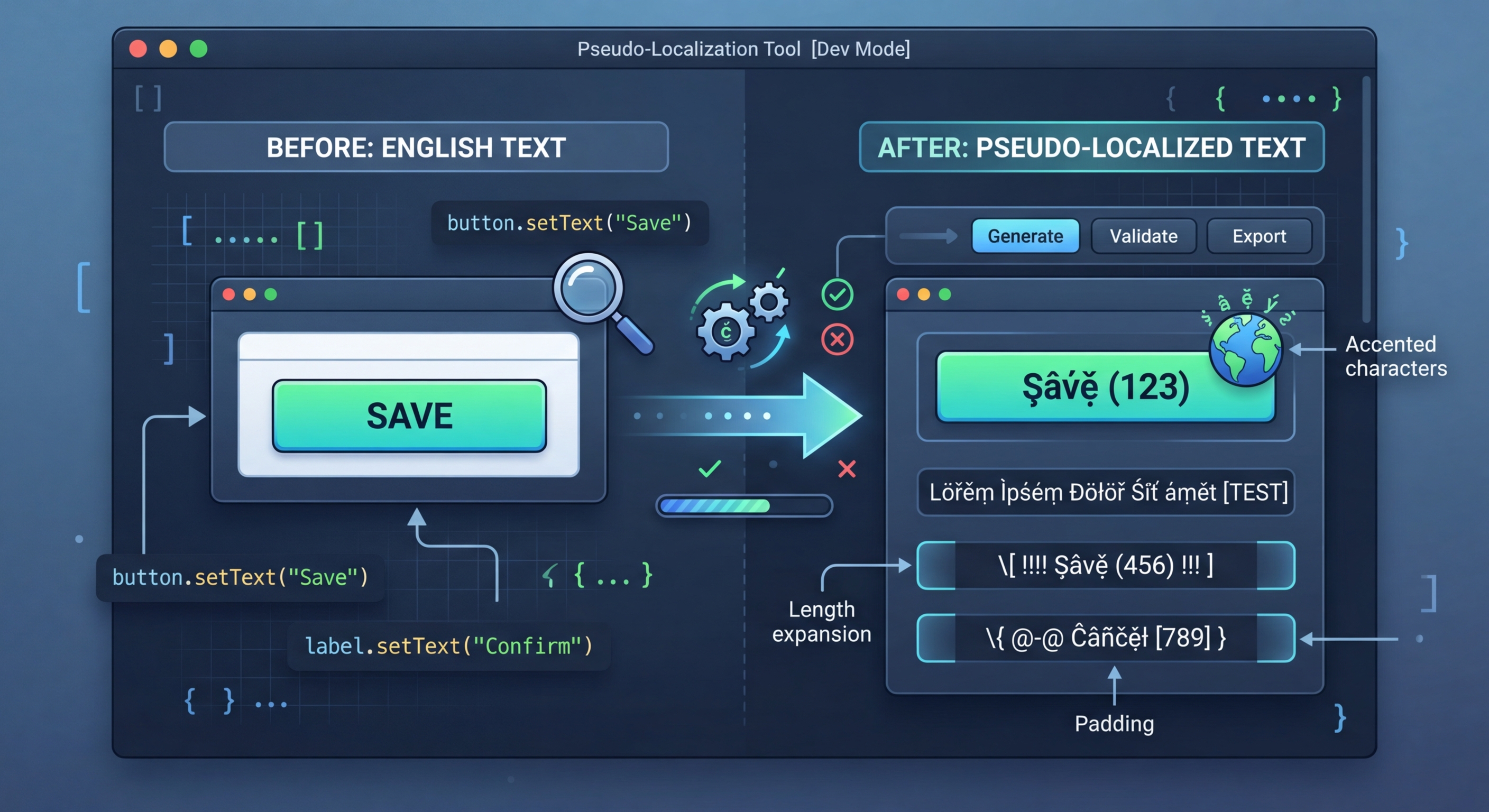
स्यूडो-लोकलाइज़ेशन: वास्तविक अनुवादों के बिना i18n की तैयारी जाँचें
वास्तविक अनुवादों में समय और पैसा लगता है। स्यूडो-लोकलाइज़ेशन आपकी सोर्स स्ट्रिंग को ऐसे टेक्स्ट में बदलता है जो पढ़ने योग्य तो होता है, लेकिन स्पष्ट रूप से नकली दिखता है और i18n बग तुरंत उजागर कर देता है — हार्डकोडेड स्ट्रिंग, टेक्स्ट ओवरफ़्लो, RTL संबंधी समस्याएँ और कन्कैटनेशन की दिक्कतें।
स्यूडो-लोकलाइज़ेशन क्या है?
स्यूडो-लोकलाइज़ेशन आपकी सोर्स स्ट्रिंग के कैरेक्टर को उनसे दिखने में मिलते-जुलते ऐक्सेंटेड या एक्सटेंडेड कैरेक्टर से बदलता है, टेक्स्ट विस्तार के लिए पैडिंग जोड़ता है और स्ट्रिंग को ब्रैकेट में रखता है। इससे मिला टेक्स्ट डेवलपर के लिए पढ़ने योग्य रहता है, लेकिन वास्तविक टेक्स्ट से स्पष्ट रूप से अलग दिखता है — इसलिए उन स्ट्रिंग को पहचानना बेहद आसान हो जाता है जिन्हें ट्रांसलेशन फ़ंक्शन में रैप नहीं किया गया था।
// Pseudo-localization transforms your source strings
// to simulate translation without real translators

// Original:
"Welcome to our application"

// Accented (simulates diacritics):
"[Ẁëľčöṁë ţö öüŕ àṗṗľïčàţïöñ]"

// Expanded (simulates text expansion ~30%):
"[Weeelcooomee tooo ouuur aaappliiicaaatiiioon]"

// Mirrored (simulates RTL layout):
"[noitacilppa ruo ot emocleW]"

// Brackets make untranslated strings immediately visibleअपने प्रोजेक्ट में उपयोग
i18n-pseudo इंस्टॉल करें और इसे अपनी लोकेल फ़ाइलों पर चलाएँ। यह टूल फ़ाइल फ़ॉर्मैट का अपने आप पता लगाता है और स्यूडो-लोकलाइज़्ड वर्ज़न जनरेट करता है, जिसे आप अपने ऐप में टेस्ट लोकेल के रूप में लोड कर सकते हैं।
// 1. Hardcoded strings (not wrapped in t())
// Pseudo strings have brackets/accents, so untranslated
// strings are immediately obvious in the UI

// 2. Text truncation
// Expanded text reveals buttons and labels that break
// when translations are longer than English

// 3. Layout issues
// Accented characters reveal font rendering problems
// RTL mode reveals directional layout bugs

// 4. Concatenation bugs
// "Hello " + name vs t('greeting', { name })
// Pseudo-localization breaks concatenated strings

// 5. Missing i18n wrappers
// Any string not going through the i18n system
// appears as plain English among pseudo textरूपांतरण की 7 रणनीतियाँ
i18n-pseudo रूपांतरण की 7 रणनीतियाँ प्रदान करता है, जिनमें से हर रणनीति आपके i18n इम्प्लीमेंटेशन के एक अलग पहलू की जाँच करती है। लक्षित परीक्षण के लिए इनका अलग-अलग उपयोग करें या व्यापक कवरेज के लिए इन्हें प्रीसेट के साथ मिलाएँ।
// Strategy 1: Accented characters
// Replace ASCII with similar-looking Unicode
// a -> à, e -> ë, o -> ö, etc.
// Preserves readability while testing rendering

// Strategy 2: Text expansion
// Pad strings to simulate longer translations
// German is ~30% longer, Finnish ~40% longer
// Helps catch UI overflow early

// Strategy 3: Brackets/wrappers
// Wrap strings in [brackets] or «guillemets»
// Makes untranslated strings visually obvious

// Strategy 4: Bidi/RTL
// Mirror text for right-to-left testing
// Catches layout issues before Arabic/Hebrew testing

// Strategy 5: Combined
// Apply all strategies simultaneously
// Maximum coverage in one pass5 बिल्ट-इन प्रीसेट
प्रीसेट कई रणनीतियों को मिलाकर आम तौर पर ज़रूरी कॉन्फ़िगरेशन तैयार करते हैं। तुरंत परीक्षण के लिए किसी प्रीसेट का उपयोग करें या अपनी खास ज़रूरतों के लिए कस्टम कॉम्बिनेशन बनाएँ।
// Using i18n-pseudo CLI
npx i18n-pseudo generate \
  --source locales/en.json \
  --output locales/pseudo.json \
  --preset accented

# Available presets:
# accented  - Ḣëľľö Ẁöŕľð (default)
# expanded  - Heeellooo Wooorld
# mirrored  - dlroW olleH
# brackets  - [Hello World]
# maximum   - [Ḣëëëľľľöööö Ẁöööŕŕŕľľľðððð]

// i18n-pseudo.config.json
{
  "source": "locales/en.json",
  "output": "locales/pseudo.json",
  "preset": "maximum",
  "expansion": 1.4,
  "wrapper": ["[", "]"],
  "exclude": [
    "*.url",
    "*.email",
    "branding.*"
  ]
}CI/CD इंटीग्रेशन
i18n रिग्रेशन का अपने आप पता लगाने के लिए CI में स्यूडो-लोकलाइज़ेशन चलाएँ। स्यूडो-लोकलाइज़्ड फ़ाइलें जनरेट करें, मुख्य स्क्रीन रेंडर करें और उनकी तुलना बेसलाइन स्क्रीनशॉट से करें। स्क्रीनशॉट में बिना रूपांतरित हुआ कोई भी टेक्स्ट रिग्रेशन है — यानी एक नई हार्डकोडेड स्ट्रिंग, जो ट्रांसलेशन फ़ंक्शन से गुज़रे बिना निकल गई।
# .github/workflows/pseudo-check.yml
name: Pseudo-Localization Check

on:
  pull_request:
    paths:
      - 'src/**'

jobs:
  pseudo-test:
    runs-on: ubuntu-latest
    steps:
      - uses: actions/checkout@v4

      - name: Setup Node.js
        uses: actions/setup-node@v4
        with:
          node-version: 20

      - name: Install dependencies
        run: npm ci

      - name: Generate pseudo locale
        run: npx i18n-pseudo generate \
          --source locales/en.json \
          --output locales/pseudo.json \
          --preset maximum

      - name: Build with pseudo locale
        run: npm run build
        env:
          NEXT_PUBLIC_LOCALE: pseudo

      - name: Run visual regression tests
        run: npx playwright test --project=pseudo
        env:
LOCALE: pseudoi18n Agent अभी आज़माएँ
अपनी अनुवाद फ़ाइल यहाँ छोड़ें
JSON, YAML, PO, XML, CSV, Markdown, Properties
या ब्राउज़ करने के लिए क्लिक करें
लक्षित भाषाएँ