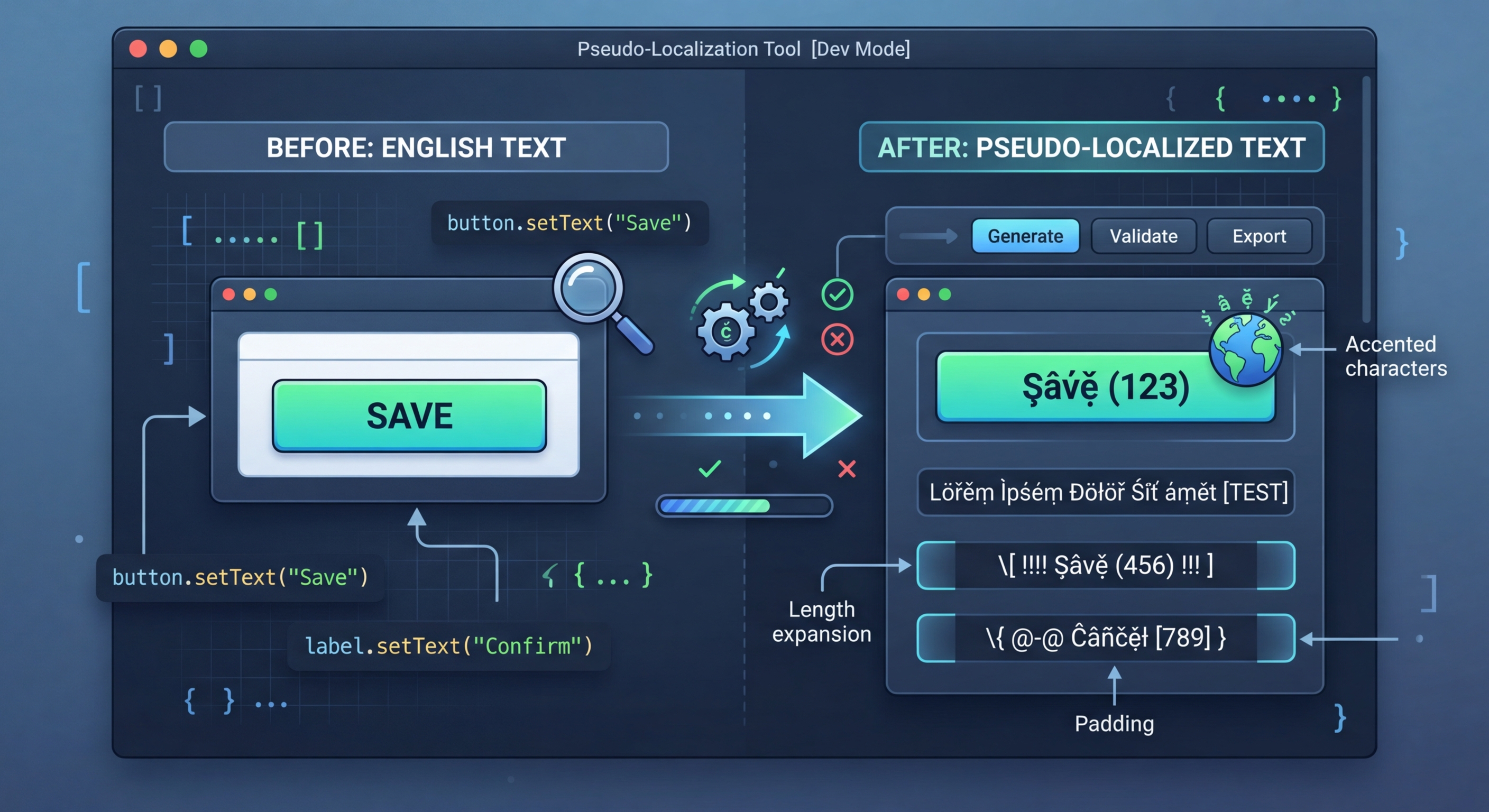
Pseudolocalização: teste a preparação de i18n sem traduções reais
As traduções reais exigem tempo e dinheiro. A pseudolocalização transforma as suas cadeias de origem em texto legível, mas obviamente falso, que revela de imediato erros de i18n: cadeias codificadas diretamente, texto excedente, problemas de RTL e problemas de concatenação.
O que é a pseudolocalização?
A pseudolocalização substitui os carateres das suas cadeias de origem por carateres acentuados ou expandidos visualmente semelhantes, acrescenta enchimento para expandir o texto e envolve as cadeias em parênteses retos. O resultado continua legível para os programadores, mas é claramente diferente do texto real, o que permite detetar facilmente cadeias que não foram envolvidas em funções de tradução.
// Pseudo-localization transforms your source strings
// to simulate translation without real translators

// Original:
"Welcome to our application"

// Accented (simulates diacritics):
"[Ẁëľčöṁë ţö öüŕ àṗṗľïčàţïöñ]"

// Expanded (simulates text expansion ~30%):
"[Weeelcooomee tooo ouuur aaappliiicaaatiiioon]"

// Mirrored (simulates RTL layout):
"[noitacilppa ruo ot emocleW]"

// Brackets make untranslated strings immediately visibleUtilização no seu projeto
Instale i18n-pseudo e execute-o nos seus ficheiros de região. A ferramenta deteta automaticamente o formato do ficheiro e gera uma versão pseudolocalizada que pode carregar como região de teste na sua aplicação.
// 1. Hardcoded strings (not wrapped in t())
// Pseudo strings have brackets/accents, so untranslated
// strings are immediately obvious in the UI

// 2. Text truncation
// Expanded text reveals buttons and labels that break
// when translations are longer than English

// 3. Layout issues
// Accented characters reveal font rendering problems
// RTL mode reveals directional layout bugs

// 4. Concatenation bugs
// "Hello " + name vs t('greeting', { name })
// Pseudo-localization breaks concatenated strings

// 5. Missing i18n wrappers
// Any string not going through the i18n system
// appears as plain English among pseudo text7 estratégias de transformação
i18n-pseudo fornece 7 estratégias de transformação, cada uma destinada a testar um aspeto diferente da sua implementação de i18n. Utilize-as individualmente em testes direcionados ou combine-as com predefinições para obter uma cobertura abrangente.
// Strategy 1: Accented characters
// Replace ASCII with similar-looking Unicode
// a -> à, e -> ë, o -> ö, etc.
// Preserves readability while testing rendering

// Strategy 2: Text expansion
// Pad strings to simulate longer translations
// German is ~30% longer, Finnish ~40% longer
// Helps catch UI overflow early

// Strategy 3: Brackets/wrappers
// Wrap strings in [brackets] or «guillemets»
// Makes untranslated strings visually obvious

// Strategy 4: Bidi/RTL
// Mirror text for right-to-left testing
// Catches layout issues before Arabic/Hebrew testing

// Strategy 5: Combined
// Apply all strategies simultaneously
// Maximum coverage in one pass5 predefinições integradas
As predefinições combinam várias estratégias nas configurações necessárias mais comuns. Utilize uma predefinição em testes rápidos ou crie combinações personalizadas para as suas necessidades específicas.
// Using i18n-pseudo CLI
npx i18n-pseudo generate \
  --source locales/en.json \
  --output locales/pseudo.json \
  --preset accented

# Available presets:
# accented  - Ḣëľľö Ẁöŕľð (default)
# expanded  - Heeellooo Wooorld
# mirrored  - dlroW olleH
# brackets  - [Hello World]
# maximum   - [Ḣëëëľľľöööö Ẁöööŕŕŕľľľðððð]

// i18n-pseudo.config.json
{
  "source": "locales/en.json",
  "output": "locales/pseudo.json",
  "preset": "maximum",
  "expansion": 1.4,
  "wrapper": ["[", "]"],
  "exclude": [
    "*.url",
    "*.email",
    "branding.*"
  ]
}Integração com CI/CD
Execute a pseudolocalização em CI para detetar automaticamente regressões de i18n. Gere ficheiros pseudolocalizados, apresente os ecrãs principais e compare-os com capturas de ecrã de referência. Qualquer texto não transformado nas capturas de ecrã é uma regressão: uma nova cadeia codificada diretamente que contornou a função de tradução.
# .github/workflows/pseudo-check.yml
name: Pseudo-Localization Check

on:
  pull_request:
    paths:
      - 'src/**'

jobs:
  pseudo-test:
    runs-on: ubuntu-latest
    steps:
      - uses: actions/checkout@v4

      - name: Setup Node.js
        uses: actions/setup-node@v4
        with:
          node-version: 20

      - name: Install dependencies
        run: npm ci

      - name: Generate pseudo locale
        run: npx i18n-pseudo generate \
          --source locales/en.json \
          --output locales/pseudo.json \
          --preset maximum

      - name: Build with pseudo locale
        run: npm run build
        env:
          NEXT_PUBLIC_LOCALE: pseudo

      - name: Run visual regression tests
        run: npx playwright test --project=pseudo
        env:
LOCALE: pseudoExperimente já o i18n Agent
Largue aqui o seu ficheiro de tradução
JSON, YAML, PO, XML, CSV, Markdown, Properties
ou clique para selecionar
Idiomas de destino