Разширяване на текста при i18n: предотвратете нарушаването на оформлението заради дължината на превода
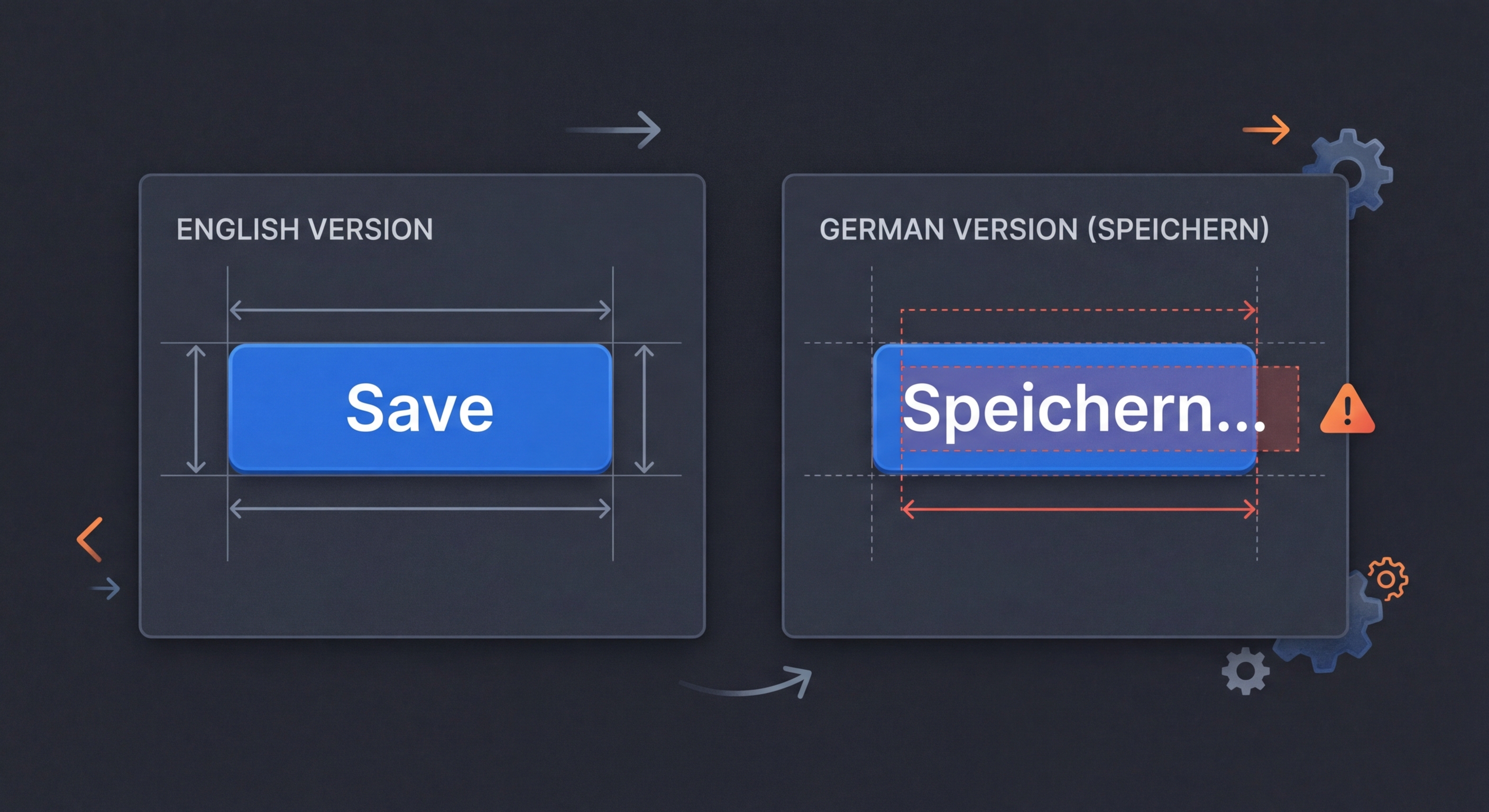
Интерфейсът Ви на английски изглежда идеално. След това пристигат преводите на немски — с 30% по-дълги. На фински са с 40% по-дълги. Текстът излиза извън бутоните, таблиците се разпадат, а грижливо проектираното оформление се нарушава. Тестването за разширяване на текста предотвратява това.
Защо разширяването на текста нарушава оформленията
Разработчиците проектират интерфейси с текст на английски — един от най-компактните езици. Когато пристигнат преводите, текстът на по-многословните езици излиза извън контейнерите, нарушава мрежовите оформления, съкращава надписите на бутоните и измества съдържанието извън екрана. Тези дефекти се появяват само при определени локализации и остават невидими при разработка и тестване единствено на английски.
// English is one of the most compact languages.
// Translations are almost always LONGER.

// English (source):
"Save"           // 4 chars

// Translations:
"Speichern"      // German: 10 chars (+150%)
"Enregistrer"    // French: 12 chars (+200%)
"Guardar"        // Spanish: 7 chars (+75%)
"Сохранить"      // Russian: 9 chars (+125%)
"Tallenna"       // Finnish: 8 chars (+100%)

// Buttons, labels, and table headers designed for
// English text WILL break in other languages.Коефициенти на разширяване на текста по езици
Средни коефициенти на разширяване спрямо изходния текст на английски. Кратките низове (под 20 знака) се разширяват повече от дългите, тъй като изборът на отделни думи влияе по-силно върху общата дължина.
// Average text expansion relative to English:

// European languages:
// German:     +30-35%  (compound words)
// Finnish:    +30-40%  (agglutinative)
// French:     +15-25%  (articles, prepositions)
// Spanish:    +15-25%
// Italian:    +15-25%
// Portuguese: +15-25%
// Russian:    +20-30%  (case endings)
// Polish:     +20-30%
// Greek:      +20-30%

// Asian languages (CJK):
// Chinese:    -30-50%  (shorter in characters, but wider per char)
// Japanese:   -20-40%  (kanji compress meaning)
// Korean:     -10-20%

// Right-to-left:
// Arabic:     +20-30%
// Hebrew:     +10-20%

// Rule of thumb by source string length:
// 1-10 chars:   expect +200% expansion
// 11-20 chars:  expect +80% expansion
// 21-70 chars:  expect +40% expansion
// 71+ chars: expect +30% expansionТестване с i18n-pseudo
Стратегията за разширяване на i18n-pseudo добавя запълващи знаци към изходните Ви низове, за да моделира дължината на превода. Задайте коефициент на разширяване според целевите езици и тествайте оформленията си, преди да пристигнат истинските преводи.
# Method 1: Pseudo-localization with expansion
npx i18n-pseudo generate \
  --source locales/en.json \
  --output locales/pseudo-expanded.json \
  --expansion 1.4 \
  --preset expanded

# Method 2: Longest-translation analysis
npx i18n-validate expansion \
  --source locales/en.json \
  --targets 'locales/*.json' \
  --report expansion-report.json

# Output:
# Key                  | EN  | Longest | Lang | Ratio
# ---------------------|-----|---------|------|-------
# nav.settings         | 8   | 14      | de   | 175%
# buttons.save         | 4   | 12      | fr   | 300%
# errors.networkFailed | 14  | 28      | fi   | 200%

# Method 3: Visual regression with expanded text
npx playwright test \
  --project=expansion-test \
--update-snapshots// playwright.config.ts
export default defineConfig({
projects: [
{
name: 'expansion-test',
use: {
locale: 'pseudo-expanded',
},
},
],
});
// tests/expansion.spec.ts
test('buttons do not overflow with expanded text', async ({ page }) => {
await page.goto('/');
// Check no horizontal overflow
const buttons = await page.locator('button').all();
for (const button of buttons) {
const box = await button.boundingBox();
const parent = await button.locator('..').boundingBox();
expect(box!.x + box!.width).toBeLessThanOrEqual(
parent!.x + parent!.width
);
}
// Visual snapshot comparison
await expect(page).toHaveScreenshot('homepage-expanded.png', {
maxDiffPixels: 100,
});
});Добри практики за дизайн, съобразен с i18n
Създаването на оформления, които поемат разширяването на текста, изисква дизайнерски решения още преди началото на превода. Тези практики предотвратяват най-честите дефекти, свързани с разширяването.
/* 1. Use flexible containers, not fixed widths */
/* WRONG */
.button { width: 120px; }

/* RIGHT */
.button { min-width: 80px; padding: 8px 16px; }

/* 2. Allow text wrapping in labels */
/* WRONG */
.label { white-space: nowrap; overflow: hidden; }

/* RIGHT */
.label { overflow-wrap: break-word; }

/* 3. Use CSS Grid/Flexbox for adaptive layouts */
.nav {
  display: flex;
  flex-wrap: wrap;
  gap: 8px;
}

/* 4. Reserve space for the longest expected translation */
/* Use min-width based on ~1.4x English length */
.table-header {
  min-width: max-content;
  padding-right: 16px;
}

/* 5. Test with the longest language first */
/* German and Finnish are good stress-test languages */

/* 6. For CJK: account for wider characters */
/* CJK characters are typically 2x the width of Latin chars */
/* Even though text is shorter, it may be wider visually */Изпробвайте i18n Agent сега
Пуснете тук Вашия файл за превод
JSON, YAML, PO, XML, CSV, Markdown, Properties
или натиснете, за да изберете файл
Целеви езици