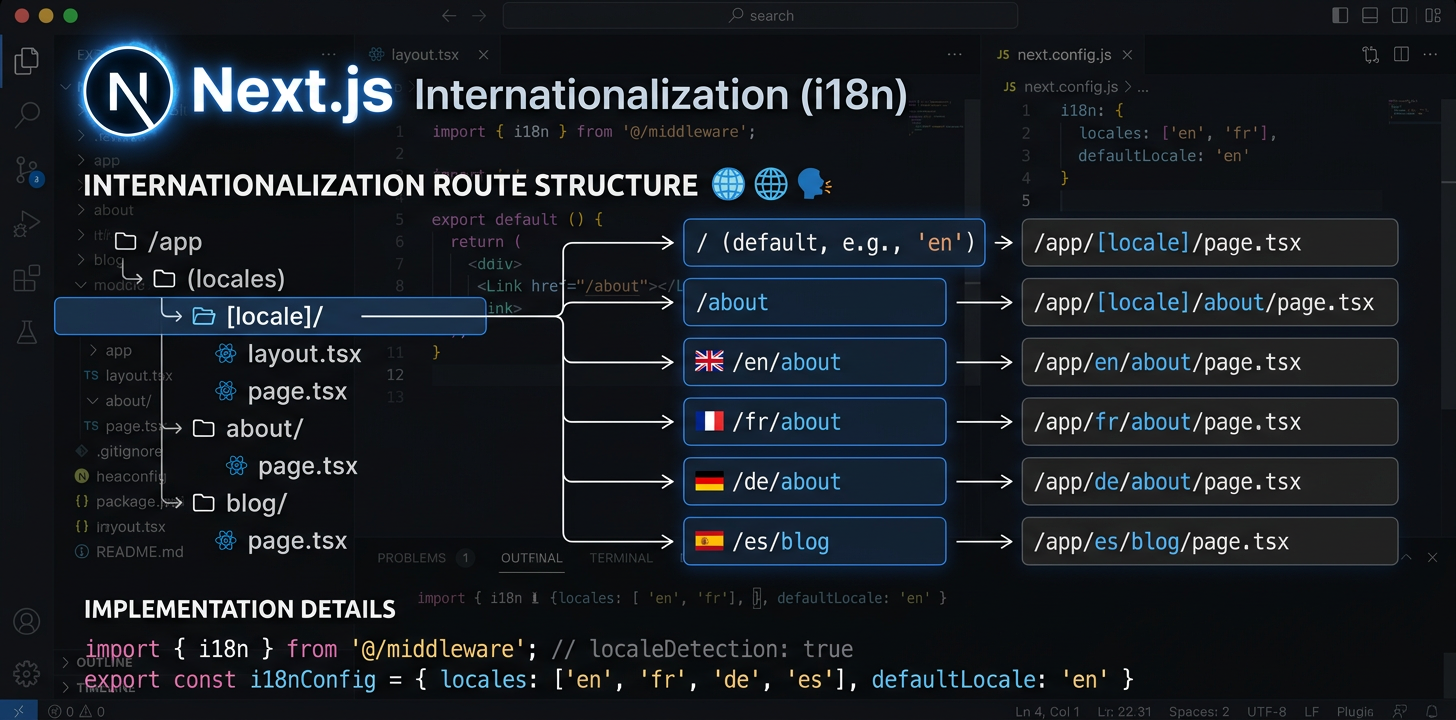
Повний посібник з інтернаціоналізації в Next.js
Налаштуйте next-intl з App Router, сконфігуруйте маршрутизацію за локалями й автоматизуйте переклад за допомогою ШІ.
Установити next-intl
next-intl — це єдиний пакет, який забезпечує маршрутизацію за локалями, завантаження повідомлень і хуки перекладу для Next.js App Router.
npm install next-intlСтворити конфігурацію запитів i18n
Створіть два файли: src/i18n/request.ts для завантаження повідомлень і src/i18n/routing.ts для визначення локалей. Вони визначають, як next-intl завантажує повідомлення та формує маршрути.
// src/i18n/routing.ts
import { defineRouting } from 'next-intl/routing';
import { createNavigation } from 'next-intl/navigation';

export const routing = defineRouting({
  locales: ['en', 'de', 'ja', 'es'],
  defaultLocale: 'en',
  localePrefix: 'as-needed',  // /about for en, /de/about for de
});

export const { Link, redirect, usePathname, useRouter } =
createNavigation(routing);Налаштувати проміжне програмне забезпечення
Додайте middleware.ts для визначення локалі, перезаписування URL і перенаправлень. Проміжне програмне забезпечення перехоплює кожен запит і забезпечує застосування правильної локалі.
// middleware.ts  <- Must be in project ROOT, not src/
import createMiddleware from 'next-intl/middleware';
import { routing } from './src/i18n/routing';

export default createMiddleware(routing);

export const config = {
  matcher: ['/((?!api|_next|.*\\..*).*)'],
};Налаштувати структуру папки [locale]
Перемістіть маршрути застосунку до app/[locale]/. Додайте generateStaticParams, щоб під час збирання створювати сторінки для кожної локалі. Так формується структура URL /en/about, /de/about тощо.
// app/[locale]/layout.tsx
import { routing } from '@/i18n/routing';

export function generateStaticParams() {
  return routing.locales.map((locale) => ({ locale }));
}Оновити кореневий макет
Завантажте повідомлення за допомогою getMessages() і передайте їх до NextIntlClientProvider у кореневому макеті локалі. Установіть для атрибута lang елемента html значення параметра локалі.
// app/[locale]/layout.tsx
import { NextIntlClientProvider } from 'next-intl';
import { getMessages, setRequestLocale } from 'next-intl/server';
import { routing } from '@/i18n/routing';
import { notFound } from 'next/navigation';

export function generateStaticParams() {
  return routing.locales.map((locale) => ({ locale }));
}

export default async function LocaleLayout({
  children,
  params,
}: {
  children: React.ReactNode;
  params: { locale: string };
}) {
  const { locale } = await params;
  if (!routing.locales.includes(locale as any)) notFound();

  setRequestLocale(locale);
  const messages = await getMessages();

  return (
    <html lang={locale}>
      <body>
        <NextIntlClientProvider locale={locale} messages={messages}>
          {children}
        </NextIntlClientProvider>
      </body>
    </html>
  );
}Використати переклади в компонентах
Серверні компоненти використовують getTranslations (async, await), а клієнтські — useTranslations (хук). Вибирайте відповідно до місця рендерингу компонента: завдяки серверним компонентам переклади взагалі не потрапляють до пакета JavaScript.
// Server Component (default)
import { getTranslations, setRequestLocale } from 'next-intl/server';

export default async function AboutPage({
  params,
}: { params: { locale: string } }) {
  const { locale } = await params;
  setRequestLocale(locale);
  const t = await getTranslations('AboutPage');

  return <h1>{t('title')}</h1>;
}

// Client Component ('use client')
'use client';
import { useTranslations } from 'next-intl';

export default function SearchBar() {
  const t = useTranslations('SearchBar');
  return <input placeholder={t('placeholder')} />;
}Додати SEO: метадані та hreflang
Використовуйте generateMetadata, щоб створювати заголовки й описи сторінок для кожної локалі. Додайте alternates.languages для тегів hreflang, щоб пошукові системи знаходили всі мовні версії кожної сторінки.
// app/[locale]/layout.tsx or any page.tsx
import { getTranslations } from 'next-intl/server';
import { routing } from '@/i18n/routing';

export async function generateMetadata({
  params,
}: { params: { locale: string } }) {
  const { locale } = await params;
  const t = await getTranslations({ locale, namespace: 'Metadata' });

  return {
    title: t('title'),
    description: t('description'),
    alternates: {
      languages: Object.fromEntries(
        routing.locales.map((l) => [l, `/${l}`])
      ),
    },
  };
}Опрацювати сторінки помилок і сторінки «Не знайдено»
error.tsx і not-found.tsx потребують особливого опрацювання, оскільки можуть відображатися поза звичайним макетом локалі. Для показу локалізованих повідомлень про помилки кореневий not-found.tsx потребує власного налаштування постачальника i18n.
// app/[locale]/error.tsx
'use client';
import { useTranslations } from 'next-intl';

export default function Error() {
  const t = useTranslations('Error');
  return (
    <div>
      <h1>{t('title')}</h1>
      <p>{t('description')}</p>
    </div>
  );
}

// app/not-found.tsx (root level -- needs own provider)
import { routing } from '@/i18n/routing';

export default async function GlobalNotFound() {
  return (
    <html lang={routing.defaultLocale}>
      <body>
        <h1>404 - Page Not Found</h1>
      </body>
    </html>
  );
}Автоматизувати переклад
Після завершення налаштування i18n перекладайте файли повідомлень за допомогою ШІ безпосередньо в IDE або використовуйте CLI i18n Agent у конвеєрі CI/CD для автоматичного перекладу під час кожного розгортання.
# In your IDE, ask your AI assistant:
> Translate messages/en.json to German, Japanese, and Spanish

✓ messages/de.json created (1.1s)
✓ messages/ja.json created (1.4s)
✓ messages/es.json created (1.0s)Автоматизувати контроль якості перекладу
Інструменти з відкритим кодом для i18n у Next.js
Ці пакети з відкритим кодом усувають типові труднощі в процесах інтернаціоналізації Next.js.
next-intl-localechain
Стандартний next-intl одразу переходить до Вашої стандартної локалі, якщо переклад відсутній. Через це користувач із бразильською португальською бачить англійський текст замість цілком придатного перекладу pt-PT. next-intl-localechain додає інтелектуальні ланцюжки резервних локалей: він глибоко об’єднує переклади зі споріднених локалей, тому користувачі регіональних варіантів завжди бачать найближчий доступний переклад.
import { getRequestConfig } from 'next-intl/server';
import { withLocaleChain } from 'next-intl-localechain';

export default getRequestConfig(withLocaleChain({
  loadMessages: (locale) =>
    import(`../../messages/${locale}.json`).then(m => m.default),
  defaultLocale: 'en'
}));@i18n-agent/cli
Інструмент командного рядка для перекладу файлів повідомлень Next.js без виходу з термінала. Перекладайте файли безпосередньо, перевіряйте стан завдань і завантажуйте результати. Працює в конвеєрах CI/CD з автентифікацією за ключем API та забезпечує повністю автоматизовані процеси локалізації.
# Install the CLI
npm install -g @i18n-agent/cli

# Authenticate
i18nagent login

# Translate your message files
i18nagent translate ./messages/en.json --lang de,ja,es

# Or use in CI/CD with an API key
export I18N_AGENT_API_KEY=your-key-here
i18nagent translate ./messages/en.json --lang de,ja,esПоширені помилки
"Unable to find next-intl locale"
Проміжне програмне забезпечення не охопило запит. Перевірте: чи розташовано middleware.ts у кореневій папці проєкту? Чи правильно шаблон matcher виключає статичні файли? Чи додано локаль до конфігурації маршрутизації?
Неочікуваний динамічний рендеринг
На сторінці або в макеті немає setRequestLocale(locale). Без нього next-intl визначає локаль за заголовками або файлами cookie, що примусово вмикає динамічний рендеринг і унеможливлює статичне генерування.
Паралельні маршрути не працюють з i18n
Паралельні маршрути (@modal) і маршрути перехоплення ((.)photo) мають відомі несумісності з динамічним сегментом [locale]. Для таких розширених схем маршрутизації використовуйте як обхідне рішення маршрутизацію на основі проміжного програмного забезпечення.
Під час перемикання мови втрачається поточний маршрут
Під час перемикання локалі збережіть поточний pathname за допомогою usePathname() і замініть лише сегмент локалі. Будьте уважні з параметрами динамічних маршрутів: їх потрібно повторно визначити для нової локалі.
Рекомендована структура файлів
my-nextjs-app/
├── middleware.ts              # Locale routing (project root!)
├── next.config.mjs
├── messages/
│   ├── en.json                # Source messages
│   ├── de.json
│   └── ja.json
├── src/
│   ├── i18n/
│   │   ├── request.ts         # Message loading config
│   │   └── routing.ts         # Locale definitions
│   └── app/
│       └── [locale]/
│           ├── layout.tsx     # Root locale layout
│           ├── page.tsx       # Home page
│           ├── error.tsx      # Localized error page
│           ├── not-found.tsx  # Localized 404
│           └── about/
│               └── page.tsx
└── package.jsonТакож перекласти:
Спробуйте i18n Agent зараз
Перетягніть сюди файл для перекладу
JSON, YAML, PO, XML, CSV, Markdown, Properties
або натисніть, щоб вибрати
Цільові мови
Резервні локалі з next-intl-localechain
Якщо в регіональній локалі на зразок pt-BR немає ключа перекладу, next-intl одразу переходить до стандартної локалі, не перевіряючи спочатку батьківську локаль pt.
npm install next-intl-localechainimport { withLocaleChain } from 'next-intl-localechain';
export default withLocaleChain({
fallbacks: {
'pt-BR': ['pt', 'en'],
'zh-Hant-HK': ['zh-Hant', 'zh', 'en'],
},
defaultLocale: 'en',
loadMessages: (locale) => import(`./messages/${locale}.json`),
});Перегляньте наш посібник із резервних локалей, щоб дізнатися про всі підтримувані фреймворки та 75 готових ланцюжків. Learn more →