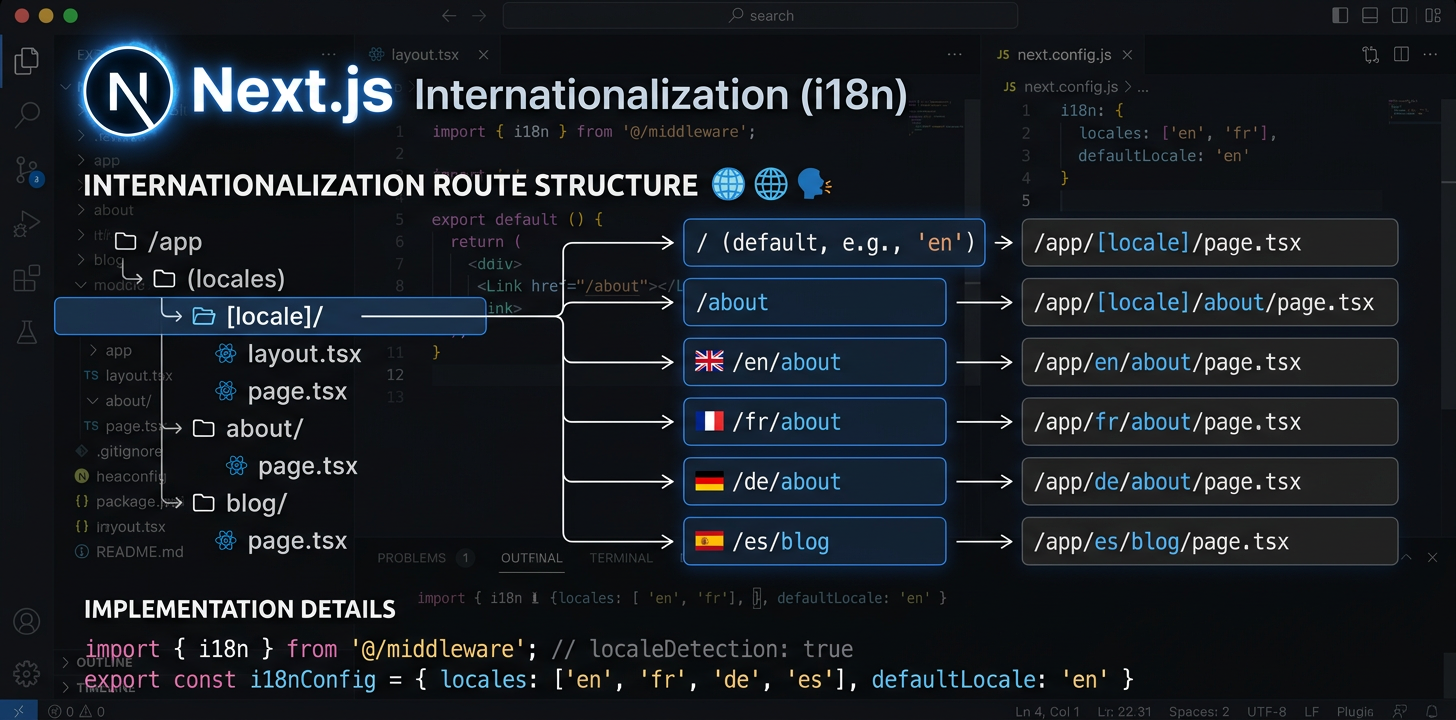
Pilnīgs Next.js internacionalizācijas ceļvedis
Iestatiet next-intl ar App Router, konfigurējiet lokalizāciju maršrutēšanu un automatizējiet tulkošanu ar MI.
Instalēt next-intl
next-intl ir viena pakotne, kas apstrādā Next.js App Router lokalizāciju maršrutēšanu, ziņojumu ielādi un tulkošanas āķus.
npm install next-intlIzveidot i18n pieprasījuma konfigurāciju
Izveidojiet divus failus: src/i18n/request.ts ziņojumu ielādei un src/i18n/routing.ts lokalizāciju definīcijām. Tie konfigurē, kā next-intl atrisina ziņojumus un maršrutus.
// src/i18n/routing.ts
import { defineRouting } from 'next-intl/routing';
import { createNavigation } from 'next-intl/navigation';

export const routing = defineRouting({
  locales: ['en', 'de', 'ja', 'es'],
  defaultLocale: 'en',
  localePrefix: 'as-needed',  // /about for en, /de/about for de
});

export const { Link, redirect, usePathname, useRouter } =
createNavigation(routing);Konfigurēt starpprogrammatūru
Pievienojiet middleware.ts lokalizācijas noteikšanai, URL pārrakstīšanai un novirzīšanai. Starpprogrammatūra pārtver katru pieprasījumu un nodrošina pareizās lokalizācijas lietošanu.
// middleware.ts  <- Must be in project ROOT, not src/
import createMiddleware from 'next-intl/middleware';
import { routing } from './src/i18n/routing';

export default createMiddleware(routing);

export const config = {
  matcher: ['/((?!api|_next|.*\\..*).*)'],
};Izveidot [locale] mapju struktūru
Pārvietojiet lietotnes maršrutus uz app/[locale]/. Pievienojiet generateStaticParams, lai būvēšanas laikā ģenerētu lapas katrai lokalizācijai. Tas izveido URL struktūru /en/about, /de/about utt.
// app/[locale]/layout.tsx
import { routing } from '@/i18n/routing';

export function generateStaticParams() {
  return routing.locales.map((locale) => ({ locale }));
}Atjaunināt saknes izkārtojumu
Ielādējiet ziņojumus ar getMessages() un nododiet tos NextIntlClientProvider saknes lokalizācijas izkārtojumā. Iestatiet html atribūtu lang no lokalizācijas parametra.
// app/[locale]/layout.tsx
import { NextIntlClientProvider } from 'next-intl';
import { getMessages, setRequestLocale } from 'next-intl/server';
import { routing } from '@/i18n/routing';
import { notFound } from 'next/navigation';

export function generateStaticParams() {
  return routing.locales.map((locale) => ({ locale }));
}

export default async function LocaleLayout({
  children,
  params,
}: {
  children: React.ReactNode;
  params: { locale: string };
}) {
  const { locale } = await params;
  if (!routing.locales.includes(locale as any)) notFound();

  setRequestLocale(locale);
  const messages = await getMessages();

  return (
    <html lang={locale}>
      <body>
        <NextIntlClientProvider locale={locale} messages={messages}>
          {children}
        </NextIntlClientProvider>
      </body>
    </html>
  );
}Izmantot tulkojumus komponentos
Servera komponenti izmanto getTranslations (asinhroni, ar await), bet klienta komponenti — useTranslations (āķi). Izvēlieties atbilstoši komponenta atveides vietai: servera komponenti tulkojumus vispār neiekļauj JavaScript komplektā.
// Server Component (default)
import { getTranslations, setRequestLocale } from 'next-intl/server';

export default async function AboutPage({
  params,
}: { params: { locale: string } }) {
  const { locale } = await params;
  setRequestLocale(locale);
  const t = await getTranslations('AboutPage');

  return <h1>{t('title')}</h1>;
}

// Client Component ('use client')
'use client';
import { useTranslations } from 'next-intl';

export default function SearchBar() {
  const t = useTranslations('SearchBar');
  return <input placeholder={t('placeholder')} />;
}Pievienot SEO: metadatus un hreflang
Izmantojiet generateMetadata lokalizācijai specifisku lapu nosaukumu un aprakstu izveidei. Pievienojiet alternates.languages hreflang tagiem, lai meklētājprogrammas atrastu katras lapas versijas visās valodās.
// app/[locale]/layout.tsx or any page.tsx
import { getTranslations } from 'next-intl/server';
import { routing } from '@/i18n/routing';

export async function generateMetadata({
  params,
}: { params: { locale: string } }) {
  const { locale } = await params;
  const t = await getTranslations({ locale, namespace: 'Metadata' });

  return {
    title: t('title'),
    description: t('description'),
    alternates: {
      languages: Object.fromEntries(
        routing.locales.map((l) => [l, `/${l}`])
      ),
    },
  };
}Apstrādāt kļūdu un neatrastu lapu skatus
error.tsx un not-found.tsx vajadzīga īpaša apstrāde, jo tie var tikt atveidoti ārpus parastā lokalizācijas izkārtojuma. Saknes not-found.tsx vajadzīgs savs i18n nodrošinātāja iestatījums, lai rādītu lokalizētus kļūdu ziņojumus.
// app/[locale]/error.tsx
'use client';
import { useTranslations } from 'next-intl';

export default function Error() {
  const t = useTranslations('Error');
  return (
    <div>
      <h1>{t('title')}</h1>
      <p>{t('description')}</p>
    </div>
  );
}

// app/not-found.tsx (root level -- needs own provider)
import { routing } from '@/i18n/routing';

export default async function GlobalNotFound() {
  return (
    <html lang={routing.defaultLocale}>
      <body>
        <h1>404 - Page Not Found</h1>
      </body>
    </html>
  );
}Automatizēt tulkošanu
Kad i18n iestatīšana ir pabeigta, tulkojiet ziņojumu failus ar MI tieši no IDE vai izmantojiet i18n Agent CLI CI/CD konveijerā automatizētai tulkošanai katrā izvietošanā.
# In your IDE, ask your AI assistant:
> Translate messages/en.json to German, Japanese, and Spanish

✓ messages/de.json created (1.1s)
✓ messages/ja.json created (1.4s)
✓ messages/es.json created (1.0s)Automatizēt tulkojumu kvalitāti
Atvērtā pirmkoda rīki Next.js i18n
Šīs atvērtā pirmkoda pakotnes risina biežas Next.js internacionalizācijas darbplūsmu problēmas.
next-intl-localechain
Ja trūkst tulkojuma, standarta next-intl uzreiz atkāpjas uz noklusējuma lokalizāciju. Brazīlijas portugāļu valodas lietotājs labu pt-PT tulkojumu vietā redz angļu valodu. next-intl-localechain pievieno viedas atkāpšanās ķēdes: tas dziļi sapludina saistītu lokalizāciju tulkojumus, lai reģionālie lietotāji vienmēr redzētu tuvāko pieejamo tulkojumu.
import { getRequestConfig } from 'next-intl/server';
import { withLocaleChain } from 'next-intl-localechain';

export default getRequestConfig(withLocaleChain({
  loadMessages: (locale) =>
    import(`../../messages/${locale}.json`).then(m => m.default),
  defaultLocale: 'en'
}));@i18n-agent/cli
Komandrindas rīks Next.js ziņojumu failu tulkošanai, neizejot no termināļa. Tulkojiet failus tieši, pārbaudiet uzdevumu stāvokli un lejupielādējiet rezultātus. Darbojas CI/CD konveijeros ar API atslēgas autentifikāciju un nodrošina pilnībā automatizētas lokalizācijas darbplūsmas.
# Install the CLI
npm install -g @i18n-agent/cli

# Authenticate
i18nagent login

# Translate your message files
i18nagent translate ./messages/en.json --lang de,ja,es

# Or use in CI/CD with an API key
export I18N_AGENT_API_KEY=your-key-here
i18nagent translate ./messages/en.json --lang de,ja,esBiežākās kļūdas
„Unable to find next-intl locale“
Starpprogrammatūra neatbilda pieprasījumam. Pārbaudiet: vai middleware.ts atrodas projekta saknē? Vai matcher modelis pareizi izslēdz statiskos failus? Vai lokalizācija ir iekļauta maršrutēšanas konfigurācijā?
Negaidīta dinamiska atveide
Lapā vai izkārtojumā trūkst setRequestLocale(locale). Bez tā next-intl lokalizācijas noteikšanai izmanto galvenes un sīkfailus, kas piespiež dinamisku atveidi un neļauj veikt statisku ģenerēšanu.
Paralēlie maršruti nedarbojas ar i18n
Paralēliem (@modal) un pārtverošiem ((.)photo) maršrutiem ir zināmas nesaderības ar dinamisko segmentu [locale]. Šiem paplašinātajiem maršrutēšanas modeļiem kā apiešanas risinājumu izmantojiet uz starpprogrammatūru balstītu maršrutēšanu.
Mainot valodu, tiek zaudēts pašreizējais maršruts
Mainot lokalizācijas, saglabājiet pašreizējo ceļa nosaukumu ar usePathname() un aizstājiet tikai lokalizācijas segmentu. Uzmanieties ar dinamiskiem maršruta parametriem — tie jaunajai lokalizācijai jāatrisina no jauna.
Ieteicamā failu struktūra
my-nextjs-app/
├── middleware.ts              # Locale routing (project root!)
├── next.config.mjs
├── messages/
│   ├── en.json                # Source messages
│   ├── de.json
│   └── ja.json
├── src/
│   ├── i18n/
│   │   ├── request.ts         # Message loading config
│   │   └── routing.ts         # Locale definitions
│   └── app/
│       └── [locale]/
│           ├── layout.tsx     # Root locale layout
│           ├── page.tsx       # Home page
│           ├── error.tsx      # Localized error page
│           ├── not-found.tsx  # Localized 404
│           └── about/
│               └── page.tsx
└── package.jsonIzmēģiniet i18n Agent tūlīt
Nometiet tulkošanas failu šeit
JSON, YAML, PO, XML, CSV, Markdown, Properties
vai noklikšķiniet, lai izvēlētos
Mērķa valodas
Lokalizācijas atkāpšanās ar next-intl-localechain
Ja reģionālajā lokalizācijā, piemēram, pt-BR, trūkst tulkojuma atslēgas, next-intl uzreiz pāriet uz noklusējuma lokalizāciju, nevis vispirms pārbauda vecāklokalizāciju pt.
npm install next-intl-localechainimport { withLocaleChain } from 'next-intl-localechain';
export default withLocaleChain({
fallbacks: {
'pt-BR': ['pt', 'en'],
'zh-Hant-HK': ['zh-Hant', 'zh', 'en'],
},
defaultLocale: 'en',
loadMessages: (locale) => import(`./messages/${locale}.json`),
});Pilnu atbalstīto sistēmu sarakstu un 75 iebūvētās ķēdes skatiet mūsu lokalizāciju atkāpšanās ceļvedī. Learn more →