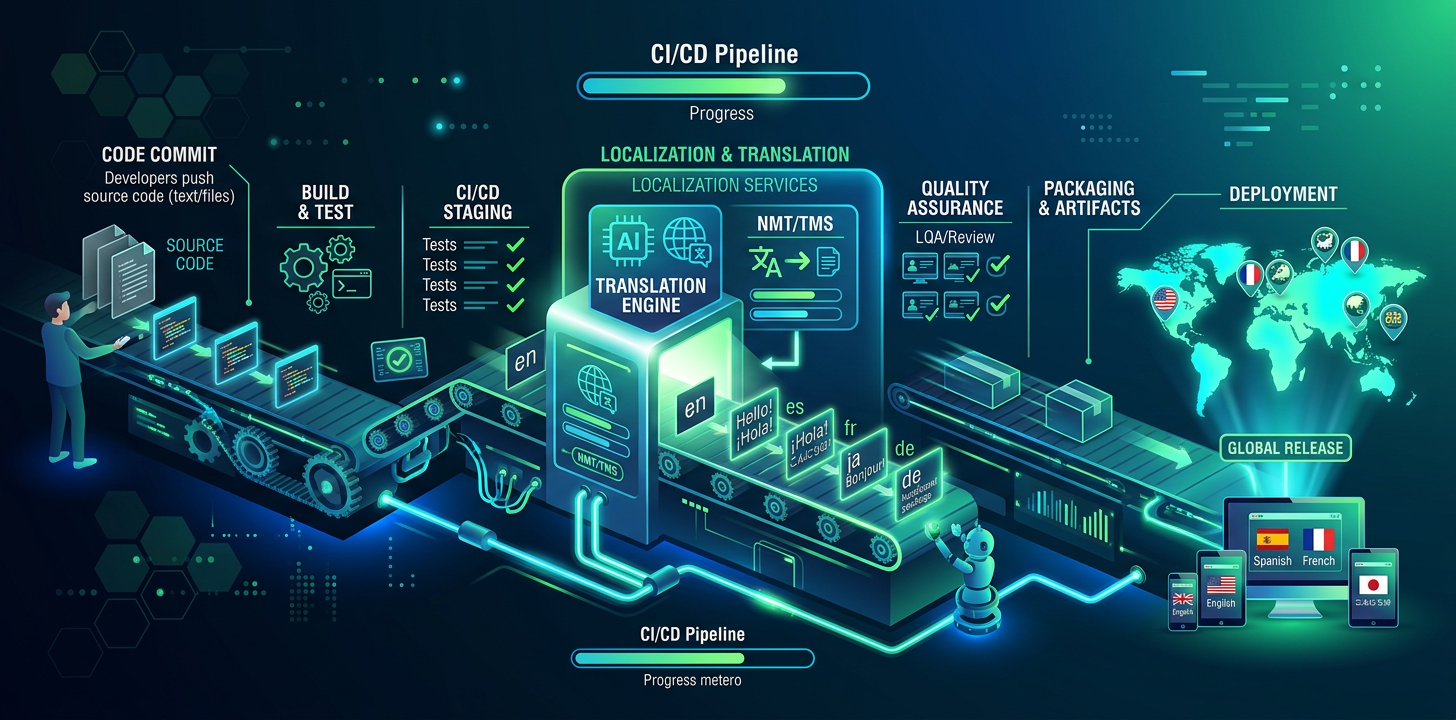
Localización continua sin TMS
Su código se implementa continuamente. Sus traducciones también deberían hacerlo. Aprenda a automatizar la localización en su flujo de desarrollo.
¿Qué es la localización continua?
La localización continua consiste en traducir automáticamente las cadenas nuevas como parte del flujo de desarrollo, en lugar de agrupar las traducciones en versiones periódicas. Cuando un desarrollador añade una funcionalidad con cadenas de interfaz, estas se traducen antes de publicarla.
El método tradicional
La mayoría de los equipos agrupa las traducciones: recopila las cadenas nuevas, las exporta a un TMS, espera a los traductores, importa los resultados y publica. Esto crea un cuello de botella que retrasa las versiones internacionales días o semanas.
El desarrollador añade cadenas nuevas al archivo de configuración regional de origen
Las cadenas se exportan y se cargan en una plataforma TMS
Se avisa a los traductores y empiezan a trabajar
Las traducciones se revisan y aprueban
Los archivos traducidos se descargan y vuelven a integrar
La funcionalidad se publica con las traducciones —días o semanas después—
El método nativo del IDE
Con la traducción integrada en el IDE, el desarrollador traduce las cadenas como parte de su flujo habitual de programación. Sin exportar, cargar ni esperar: las traducciones se realizan en la misma sesión de desarrollo.
El desarrollador añade cadenas nuevas al archivo de configuración regional de origen
El desarrollador pide a su asistente de IA que traduzca el archivo
Los archivos traducidos se escriben directamente en el proyecto
La funcionalidad se publica con las traducciones en el mismo commit
El método tradicional
6 steps
Multiple tools and platforms
Days to weeks per cycle
El método nativo del IDE
4 steps
Inside your editor
Same commit
Configure su proceso de traducción
Para los equipos que quieran automatizar la traducción más allá del IDE, añada un paso de CI/CD que traduzca las cadenas nuevas o modificadas cada vez que se envíen cambios a main. Funciona con GitHub Actions, GitLab CI o cualquier sistema de CI/CD.
Empiece con la traducción integrada en el IDE para equipos pequeños. Añada automatización de CI/CD cuando supere los 3-4 desarrolladores o necesite garantizar las traducciones en cada fusión con main.
# .github/workflows/translate.yml
name: Translate
on:
  push:
    branches: [main]
    paths: ['locales/en/**']

jobs:
  translate:
    runs-on: ubuntu-latest
    steps:
      - uses: actions/checkout@v4

      - name: Translate changed strings
        run: |
          npx i18n-agent translate locales/en.json \
            --to de,ja,es,fr,ko,zh-Hans \
            --api-key ${{ secrets.I18N_AGENT_API_KEY }}

      - name: Commit translations
        run: |
          git config user.name "github-actions"
          git config user.email "[email protected]"
          git add locales/
          git diff --cached --quiet || git commit -m "chore: update translations"
git push# .gitlab-ci.yml
translate:
stage: deploy
only:
changes:
- locales/en/**
script:
- npx i18n-agent translate locales/en.json
--to de,ja,es,fr --api-key $I18N_AGENT_API_KEY
- git add locales/ && git commit -m "chore: translations" && git pushAñadir control de calidad de las traducciones a CI
Las comprobaciones automatizadas del proceso de CI detectan traducciones ausentes, marcadores de posición rotos y formatos de mensajes ICU no válidos antes de que lleguen a producción. Son scripts sencillos que comparan el archivo regional de origen con todos los de destino.
#!/bin/bash
# check-translations.sh — Run in CI to catch missing translations

SOURCE="locales/en.json"
LANGS=("de" "ja" "es" "fr")
EXIT_CODE=0

# Extract all keys from source
SOURCE_KEYS=$(jq -r '[paths(scalars)] | map(join(".")) | .[]' "$SOURCE" | sort)
SOURCE_COUNT=$(echo "$SOURCE_KEYS" | wc -l)

for lang in "${LANGS[@]}"; do
  TARGET="locales/$lang.json"
  if [ ! -f "$TARGET" ]; then
    echo "❌ Missing: $TARGET"
    EXIT_CODE=1
    continue
  fi

  TARGET_KEYS=$(jq -r '[paths(scalars)] | map(join(".")) | .[]' "$TARGET" | sort)
  MISSING=$(comm -23 <(echo "$SOURCE_KEYS") <(echo "$TARGET_KEYS"))

  if [ -n "$MISSING" ]; then
    COUNT=$(echo "$MISSING" | wc -l)
    echo "❌ $lang: $COUNT missing keys"
    echo "$MISSING" | head -5
    EXIT_CODE=1
  else
    echo "✅ $lang: all $SOURCE_COUNT keys present"
  fi
done

exit $EXIT_CODE#!/bin/bash
# check-placeholders.sh — Validate placeholder consistency
SOURCE="locales/en.json"
LANGS=("de" "ja" "es")
for lang in "${LANGS[@]}"; do
TARGET="locales/$lang.json"
# Compare placeholders like {{name}}, {count}, %s, %d
jq -r 'paths(scalars) as $p | [($p | join(".")), (getpath($p))]
| @tsv' "$SOURCE" | while IFS=$'\t' read -r key value; do
SOURCE_PH=$(echo "$value" | grep -oE '\{\{[^}]+\}\}|%[sd@]' | sort)
TARGET_VAL=$(jq -r "getpath($(echo $key | jq -R 'split(".")'))" "$TARGET")
TARGET_PH=$(echo "$TARGET_VAL" | grep -oE '\{\{[^}]+\}\}|%[sd@]' | sort)
if [ "$SOURCE_PH" != "$TARGET_PH" ]; then
echo "❌ $lang/$key: placeholder mismatch"
echo " Source: $SOURCE_PH"
echo " Target: $TARGET_PH"
fi
done
doneValidar traducciones en CI
Detectar y gestionar la desviación de traducciones
La desviación se produce cuando cambian las cadenas de origen, pero no se actualizan las traducciones. El inglés dice «Save changes», mientras el alemán conserva el texto anterior. La detección compara las marcas de tiempo o los hashes del contenido de los archivos de origen y traducción.
#!/bin/bash
# detect-drift.sh — Find stale translations

SOURCE="locales/en.json"
SOURCE_HASH=$(md5sum "$SOURCE" | cut -d' ' -f1)
HASH_FILE=".translation-hashes"

# Compare current source hash with stored hash
if [ -f "$HASH_FILE" ]; then
  STORED_HASH=$(grep "^en:" "$HASH_FILE" | cut -d: -f2)
  if [ "$SOURCE_HASH" != "$STORED_HASH" ]; then
    echo "⚠️  Source strings changed since last translation"
    echo "   Run translations to update all locales"

    # Show which keys changed
    git diff HEAD~1 "$SOURCE" | grep '^[+-]' | grep -v '^[+-][+-]'
  fi
fi

# Update stored hash
echo "en:$SOURCE_HASH" > "$HASH_FILE"Elegir su método de traducción
No todo el contenido necesita el mismo método. Las cadenas y etiquetas de interfaz funcionan muy bien con IA. Los textos de marketing se benefician de IA y revisión humana. Los textos jurídicos y de cumplimiento siempre deben confiarse a traductores profesionales.
Translation Approach Comparison:

Content Type         | Approach          | Cost/word  | Quality
─────────────────────┼───────────────────┼────────────┼──────────
UI strings, labels   | AI/LLM            | $0.001-01  | Production
Tooltips, help text  | AI/LLM            | $0.001-01  | Production
Marketing copy       | AI + human review | $0.05-0.15 | High
Legal / compliance   | Human translator  | $0.15-0.40 | Certified
Brand voice content | Human translator | $0.20-0.50 | PremiumFlujo de Git para traducciones
Traduzca en su rama de funcionalidad antes de fusionarla, no después. Así garantiza que cada fusión con main incluya las traducciones completas. Añada una comprobación previa que verifique la cobertura en todas las configuraciones regionales admitidas.
Los archivos JSON regionales grandes provocan conflictos de fusión frecuentes cuando varias ramas los modifican a la vez. Ordene las claves alfabéticamente y utilice una por línea para reducir el tamaño de las diferencias y facilitar la resolución.
# .gitattributes — reduce merge conflicts in locale files
locales/*.json merge=union

# Sort keys alphabetically to minimize diffs:
# package.json script:
"sort-locales": "node -e \"
  const fs = require('fs');
  const f = process.argv[1];
  const d = JSON.parse(fs.readFileSync(f));
  const s = (o) => Object.keys(o).sort().reduce((r,k) =>
    ({...r, [k]: typeof o[k]==='object' ? s(o[k]) : o[k]}), {});
  fs.writeFileSync(f, JSON.stringify(s(d), null, 2)+'\\n');
\""Errores habituales
Tratar la localización como una tarea posterior al desarrollo
Sin validar las traducciones en CI
Complicar en exceso con un TMS
No realizar un seguimiento de la vigencia de las traducciones
Pruebe i18n Agent ahora
Arrastre y suelte aquí su archivo de traducción
JSON, YAML, PO, XML, CSV, Markdown, Properties
o haga clic para seleccionar
Idiomas de destino