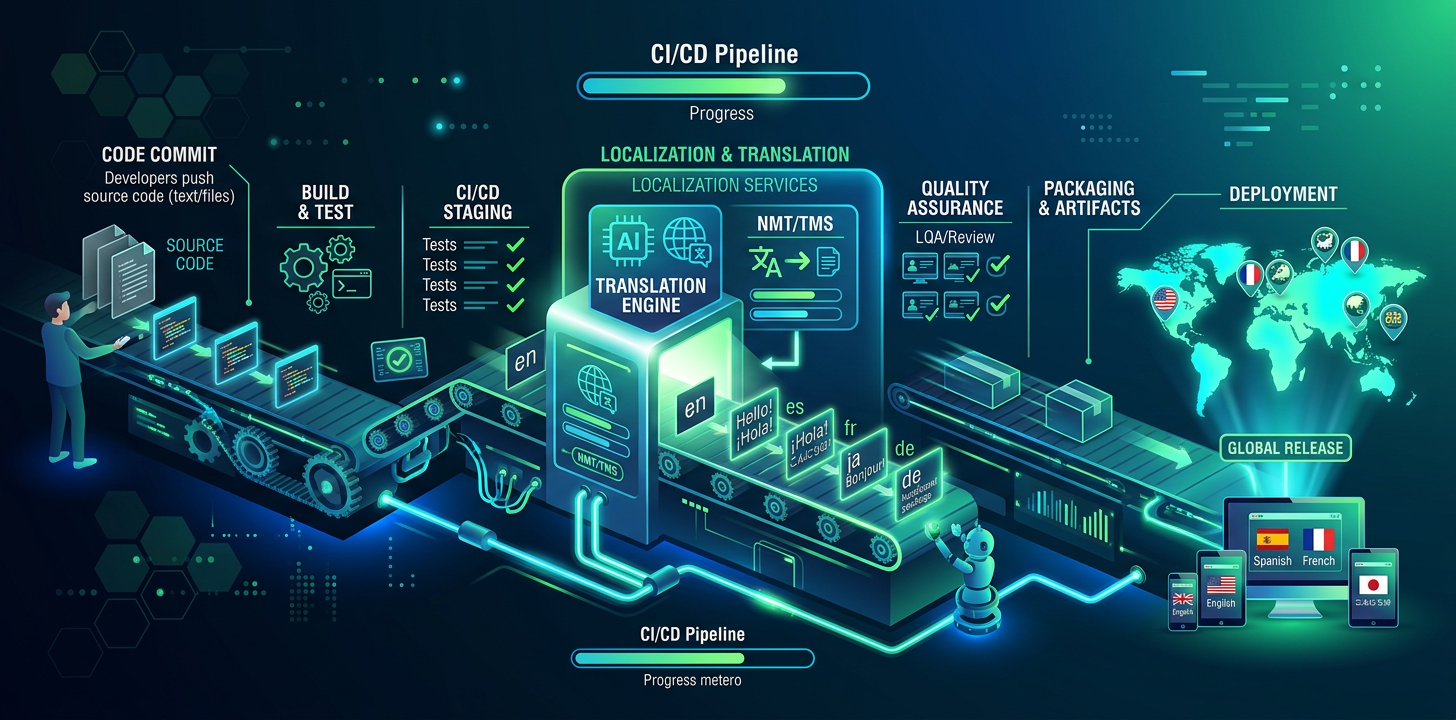
Continuous Localization Without a TMS
Your code deploys continuously. Your translations should too. Here's how to automate localization in your development workflow.
What Is Continuous Localization?
Continuous localization is the practice of translating new strings automatically as part of your development workflow, rather than batching translations into periodic releases. When a developer adds a new feature with UI strings, those strings are translated before the feature ships.
The Traditional Approach
Most teams batch translations: collect new strings, export to a TMS, wait for translators, import results, then ship. This creates a localization bottleneck that delays international releases by days or weeks.
Developer adds new strings to source locale file
Strings are exported and uploaded to TMS platform
Translators are notified and begin work
Translations are reviewed and approved
Translated files are downloaded and merged
Feature ships with translations (days/weeks later)
The IDE-Native Approach
With IDE-native translation, the developer translates strings as part of their normal coding workflow. No export, no upload, no wait.
Developer adds new strings to source locale file
Developer asks AI assistant to translate the file
Translated files are written to the project
Feature ships with translations (same commit)
The Traditional Approach
6 steps
Multiple tools and platforms
Days to weeks per cycle
The IDE-Native Approach
4 steps
Inside your editor
Same commit
A fordítási folyamat beállítása
Az IDE-n túlmutató automatizált fordítást igénylő csapatok számára adjon hozzá egy CI/CD-lépést, amely minden main ágra történő feltöltéskor lefordítja az új vagy módosított karakterláncokat. Ez GitHub Actions, GitLab CI és bármely más CI/CD-rendszerrel működik.
Kis csapatoknál kezdjen IDE-be épített fordítással. Akkor adjon hozzá CI/CD-automatizálást, amikor a csapat 3-4 fejlesztőnél nagyobbra nő, vagy minden main ági egyesítésnél garantált fordításokra van szüksége.
# .github/workflows/translate.yml
name: Translate
on:
  push:
    branches: [main]
    paths: ['locales/en/**']

jobs:
  translate:
    runs-on: ubuntu-latest
    steps:
      - uses: actions/checkout@v4

      - name: Translate changed strings
        run: |
          npx i18n-agent translate locales/en.json \
            --to de,ja,es,fr,ko,zh-Hans \
            --api-key ${{ secrets.I18N_AGENT_API_KEY }}

      - name: Commit translations
        run: |
          git config user.name "github-actions"
          git config user.email "[email protected]"
          git add locales/
          git diff --cached --quiet || git commit -m "chore: update translations"
git push# .gitlab-ci.yml
translate:
stage: deploy
only:
changes:
- locales/en/**
script:
- npx i18n-agent translate locales/en.json
--to de,ja,es,fr --api-key $I18N_AGENT_API_KEY
- git add locales/ && git commit -m "chore: translations" && git pushFordítási minőség-ellenőrzés hozzáadása a CI-hez
A CI-folyamat automatizált ellenőrzései még élesítés előtt észlelik a hiányzó fordításokat, a hibás helyőrzőket és az érvénytelen ICU-üzenetformátumokat. Ezek egyszerű szkriptek, amelyek összehasonlítják a forrásnyelvi fájlt az összes célnyelvvel.
#!/bin/bash
# check-translations.sh — Run in CI to catch missing translations

SOURCE="locales/en.json"
LANGS=("de" "ja" "es" "fr")
EXIT_CODE=0

# Extract all keys from source
SOURCE_KEYS=$(jq -r '[paths(scalars)] | map(join(".")) | .[]' "$SOURCE" | sort)
SOURCE_COUNT=$(echo "$SOURCE_KEYS" | wc -l)

for lang in "${LANGS[@]}"; do
  TARGET="locales/$lang.json"
  if [ ! -f "$TARGET" ]; then
    echo "❌ Missing: $TARGET"
    EXIT_CODE=1
    continue
  fi

  TARGET_KEYS=$(jq -r '[paths(scalars)] | map(join(".")) | .[]' "$TARGET" | sort)
  MISSING=$(comm -23 <(echo "$SOURCE_KEYS") <(echo "$TARGET_KEYS"))

  if [ -n "$MISSING" ]; then
    COUNT=$(echo "$MISSING" | wc -l)
    echo "❌ $lang: $COUNT missing keys"
    echo "$MISSING" | head -5
    EXIT_CODE=1
  else
    echo "✅ $lang: all $SOURCE_COUNT keys present"
  fi
done

exit $EXIT_CODE#!/bin/bash
# check-placeholders.sh — Validate placeholder consistency
SOURCE="locales/en.json"
LANGS=("de" "ja" "es")
for lang in "${LANGS[@]}"; do
TARGET="locales/$lang.json"
# Compare placeholders like {{name}}, {count}, %s, %d
jq -r 'paths(scalars) as $p | [($p | join(".")), (getpath($p))]
| @tsv' "$SOURCE" | while IFS=$'\t' read -r key value; do
SOURCE_PH=$(echo "$value" | grep -oE '\{\{[^}]+\}\}|%[sd@]' | sort)
TARGET_VAL=$(jq -r "getpath($(echo $key | jq -R 'split(".")'))" "$TARGET")
TARGET_PH=$(echo "$TARGET_VAL" | grep -oE '\{\{[^}]+\}\}|%[sd@]' | sort)
if [ "$SOURCE_PH" != "$TARGET_PH" ]; then
echo "❌ $lang/$key: placeholder mismatch"
echo " Source: $SOURCE_PH"
echo " Target: $TARGET_PH"
fi
done
doneFordítások ellenőrzése a CI-ben
A fordítási eltérés észlelése és kezelése
Fordítási eltérés akkor keletkezik, amikor a forrásszöveg megváltozik, a fordítás azonban nem frissül. Az angol szöveg már „Save changes”, a német viszont még a régi szöveget mutatja. Az eltérésészlelés a forrás- és fordításfájlok időbélyegeit vagy tartalomkivonatait hasonlítja össze.
#!/bin/bash
# detect-drift.sh — Find stale translations

SOURCE="locales/en.json"
SOURCE_HASH=$(md5sum "$SOURCE" | cut -d' ' -f1)
HASH_FILE=".translation-hashes"

# Compare current source hash with stored hash
if [ -f "$HASH_FILE" ]; then
  STORED_HASH=$(grep "^en:" "$HASH_FILE" | cut -d: -f2)
  if [ "$SOURCE_HASH" != "$STORED_HASH" ]; then
    echo "⚠️  Source strings changed since last translation"
    echo "   Run translations to update all locales"

    # Show which keys changed
    git diff HEAD~1 "$SOURCE" | grep '^[+-]' | grep -v '^[+-][+-]'
  fi
fi

# Update stored hash
echo "en:$SOURCE_HASH" > "$HASH_FILE"A fordítási megközelítés kiválasztása
Nem minden tartalomhoz illik ugyanaz a fordítási megközelítés. A felület szövegei és címkéi kiválóan fordíthatók mesterséges intelligenciával. A marketingszöveghez előnyös a mesterséges intelligencia és az emberi ellenőrzés kombinációja. A jogi és megfelelőségi szöveget mindig hivatásos fordítóval fordíttassa.
Translation Approach Comparison:

Content Type         | Approach          | Cost/word  | Quality
─────────────────────┼───────────────────┼────────────┼──────────
UI strings, labels   | AI/LLM            | $0.001-01  | Production
Tooltips, help text  | AI/LLM            | $0.001-01  | Production
Marketing copy       | AI + human review | $0.05-0.15 | High
Legal / compliance   | Human translator  | $0.15-0.40 | Certified
Brand voice content | Human translator | $0.20-0.50 | PremiumGit-munkafolyamat fordításokhoz
A fordítást az egyesítés előtt, a funkcióágon végezze el, ne utána. Így a main ágba történő minden egyesítés teljes fordításokat tartalmaz. Adjon hozzá egyesítés előtti ellenőrzést, amely minden támogatott területnél ellenőrzi a fordítások teljességét.
A nagy JSON területifájlok gyakori egyesítési ütközéseket okoznak, amikor több ág egyszerre módosítja őket. Rendezze a kulcsokat betűrendbe, és soronként egy kulcsot használjon a különbségek méretének csökkentéséhez és az ütközések egyszerűbb feloldásához.
# .gitattributes — reduce merge conflicts in locale files
locales/*.json merge=union

# Sort keys alphabetically to minimize diffs:
# package.json script:
"sort-locales": "node -e \"
  const fs = require('fs');
  const f = process.argv[1];
  const d = JSON.parse(fs.readFileSync(f));
  const s = (o) => Object.keys(o).sort().reduce((r,k) =>
    ({...r, [k]: typeof o[k]==='object' ? s(o[k]) : o[k]}), {});
  fs.writeFileSync(f, JSON.stringify(s(d), null, 2)+'\\n');
\""Gyakori buktatók
A lokalizáció fejlesztés utáni feladatként kezelése
Nincs CI-szintű fordításellenőrzés
Túlméretezett megoldás TMS-sel
A fordítás frissességének figyelmen kívül hagyása
Try i18n Agent Now
Drop your translation file here
JSON, YAML, PO, XML, CSV, Markdown, Properties
or click to browse
Target languages