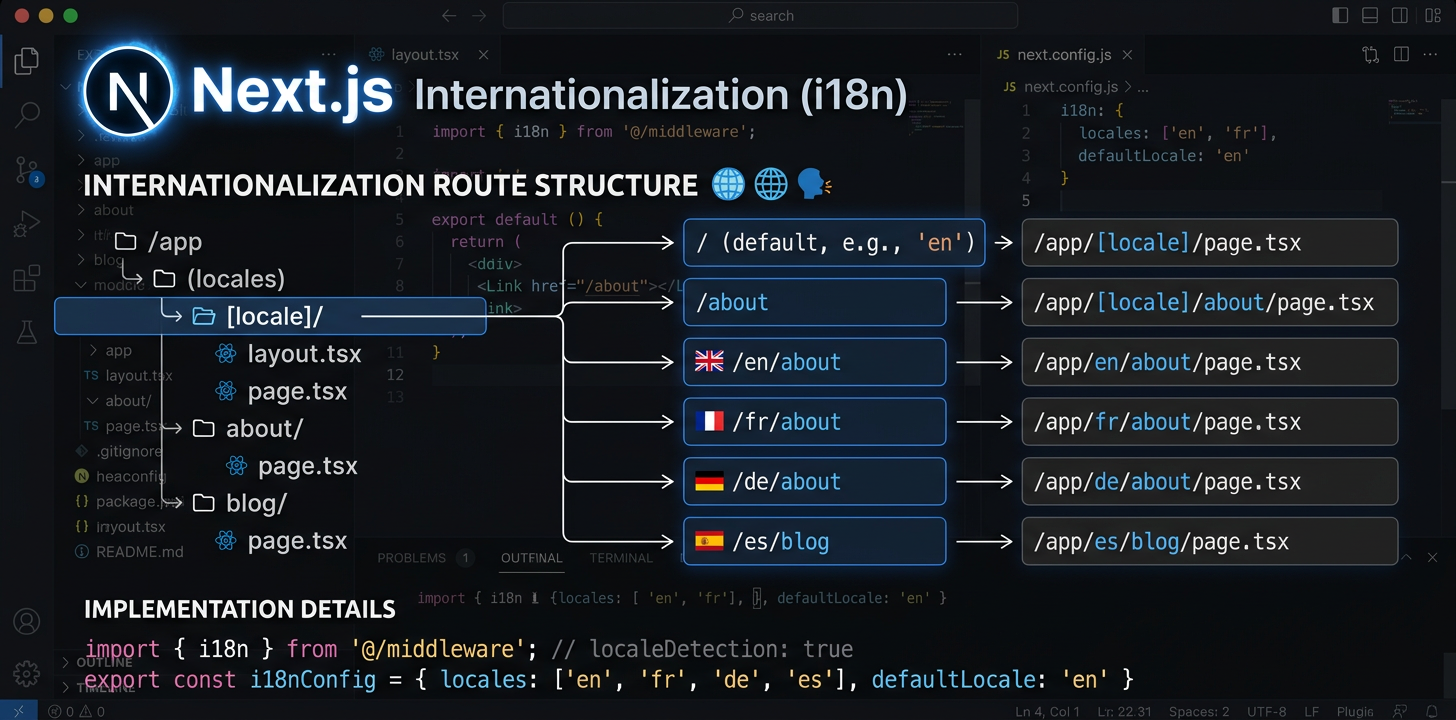
Next.js 국제화 완벽 가이드
App Router에서 next-intl을 설정하고 로케일 라우팅을 구성한 뒤 AI로 번역을 자동화하세요.
next-intl 설치
next-intl은 Next.js App Router의 로케일 라우팅, 메시지 로드, 번역 훅을 하나로 처리하는 패키지예요.
npm install next-intli18n 요청 구성 생성
메시지 로드용 src/i18n/request.ts와 로케일 정의용 src/i18n/routing.ts, 두 파일을 만드세요. 이 파일에서 next-intl이 메시지와 경로를 해석하는 방식을 구성해요.
// src/i18n/routing.ts
import { defineRouting } from 'next-intl/routing';
import { createNavigation } from 'next-intl/navigation';

export const routing = defineRouting({
  locales: ['en', 'de', 'ja', 'es'],
  defaultLocale: 'en',
  localePrefix: 'as-needed',  // /about for en, /de/about for de
});

export const { Link, redirect, usePathname, useRouter } =
createNavigation(routing);미들웨어 구성
로케일 감지, URL 재작성, 리디렉션을 처리하도록 middleware.ts를 추가하세요. 미들웨어가 모든 요청을 가로채 올바른 로케일이 적용되도록 해요.
// middleware.ts  <- Must be in project ROOT, not src/
import createMiddleware from 'next-intl/middleware';
import { routing } from './src/i18n/routing';

export default createMiddleware(routing);

export const config = {
  matcher: ['/((?!api|_next|.*\\..*).*)'],
};[locale] 폴더 구조 설정
앱 경로를 app/[locale]/ 안으로 옮기세요. 빌드할 때 로케일별 페이지를 생성하도록 generateStaticParams를 추가하세요. 그러면 /en/about, /de/about 같은 URL 구조가 만들어져요.
// app/[locale]/layout.tsx
import { routing } from '@/i18n/routing';

export function generateStaticParams() {
  return routing.locales.map((locale) => ({ locale }));
}루트 레이아웃 업데이트
getMessages()로 메시지를 로드하고 루트 로케일 레이아웃의 NextIntlClientProvider에 전달하세요. 로케일 매개변수로 html lang 속성을 설정하세요.
// app/[locale]/layout.tsx
import { NextIntlClientProvider } from 'next-intl';
import { getMessages, setRequestLocale } from 'next-intl/server';
import { routing } from '@/i18n/routing';
import { notFound } from 'next/navigation';

export function generateStaticParams() {
  return routing.locales.map((locale) => ({ locale }));
}

export default async function LocaleLayout({
  children,
  params,
}: {
  children: React.ReactNode;
  params: { locale: string };
}) {
  const { locale } = await params;
  if (!routing.locales.includes(locale as any)) notFound();

  setRequestLocale(locale);
  const messages = await getMessages();

  return (
    <html lang={locale}>
      <body>
        <NextIntlClientProvider locale={locale} messages={messages}>
          {children}
        </NextIntlClientProvider>
      </body>
    </html>
  );
}컴포넌트에서 번역 사용
서버 컴포넌트는 getTranslations (async, await)를 사용하고 클라이언트 컴포넌트는 useTranslations (훅)을 사용해요. 컴포넌트가 렌더링되는 위치에 따라 선택하세요. 서버 컴포넌트는 번역을 JavaScript 번들에서 완전히 제외해요.
// Server Component (default)
import { getTranslations, setRequestLocale } from 'next-intl/server';

export default async function AboutPage({
  params,
}: { params: { locale: string } }) {
  const { locale } = await params;
  setRequestLocale(locale);
  const t = await getTranslations('AboutPage');

  return <h1>{t('title')}</h1>;
}

// Client Component ('use client')
'use client';
import { useTranslations } from 'next-intl';

export default function SearchBar() {
  const t = useTranslations('SearchBar');
  return <input placeholder={t('placeholder')} />;
}SEO 추가: 메타데이터 및 Hreflang
generateMetadata로 로케일별 페이지 제목과 설명을 생성하세요. 검색 엔진이 모든 페이지의 각 언어 버전을 찾을 수 있도록 hreflang 태그에 alternates.languages를 추가하세요.
// app/[locale]/layout.tsx or any page.tsx
import { getTranslations } from 'next-intl/server';
import { routing } from '@/i18n/routing';

export async function generateMetadata({
  params,
}: { params: { locale: string } }) {
  const { locale } = await params;
  const t = await getTranslations({ locale, namespace: 'Metadata' });

  return {
    title: t('title'),
    description: t('description'),
    alternates: {
      languages: Object.fromEntries(
        routing.locales.map((l) => [l, `/${l}`])
      ),
    },
  };
}오류 및 Not Found 페이지 처리
error.tsx와 not-found.tsx는 일반 로케일 레이아웃 밖에서 렌더링될 수 있으므로 별도 처리가 필요해요. 루트 not-found.tsx에서 현지화된 오류 메시지를 표시하려면 자체 i18n 제공자 설정이 필요해요.
// app/[locale]/error.tsx
'use client';
import { useTranslations } from 'next-intl';

export default function Error() {
  const t = useTranslations('Error');
  return (
    <div>
      <h1>{t('title')}</h1>
      <p>{t('description')}</p>
    </div>
  );
}

// app/not-found.tsx (root level -- needs own provider)
import { routing } from '@/i18n/routing';

export default async function GlobalNotFound() {
  return (
    <html lang={routing.defaultLocale}>
      <body>
        <h1>404 - Page Not Found</h1>
      </body>
    </html>
  );
}번역 자동화
i18n 설정을 마쳤다면 IDE에서 바로 AI로 메시지 파일을 번역하거나 CI/CD 파이프라인에서 i18n Agent CLI를 사용해 배포할 때마다 번역을 자동화하세요.
# In your IDE, ask your AI assistant:
> Translate messages/en.json to German, Japanese, and Spanish

✓ messages/de.json created (1.1s)
✓ messages/ja.json created (1.4s)
✓ messages/es.json created (1.0s)번역 품질 검사 자동화
Next.js i18n용 오픈 소스 도구
이 오픈 소스 패키지는 Next.js 국제화 워크플로에서 자주 겪는 문제를 해결해요.
next-intl-localechain
기본 next-intl은 번역이 없으면 기본 로케일로 바로 폴백해요. 쓸 수 있는 pt-PT 번역이 있어도 브라질 포르투갈어 사용자에게 영어가 표시돼요. next-intl-localechain은 지능형 폴백 체인을 추가하고 관련 로케일의 번역을 재귀적으로 병합해 지역 사용자가 항상 가장 가까운 번역을 볼 수 있게 해요.
import { getRequestConfig } from 'next-intl/server';
import { withLocaleChain } from 'next-intl-localechain';

export default getRequestConfig(withLocaleChain({
  loadMessages: (locale) =>
    import(`../../messages/${locale}.json`).then(m => m.default),
  defaultLocale: 'en'
}));@i18n-agent/cli
터미널을 벗어나지 않고 Next.js 메시지 파일을 번역하는 명령줄 도구예요. 파일을 직접 번역하고 작업 상태를 확인하며 결과를 다운로드할 수 있어요. API 키 인증을 사용해 CI/CD 파이프라인에서도 작동하므로 현지화 워크플로를 완전히 자동화할 수 있어요.
# Install the CLI
npm install -g @i18n-agent/cli

# Authenticate
i18nagent login

# Translate your message files
i18nagent translate ./messages/en.json --lang de,ja,es

# Or use in CI/CD with an API key
export I18N_AGENT_API_KEY=your-key-here
i18nagent translate ./messages/en.json --lang de,ja,es흔한 실수
"Unable to find next-intl locale"
미들웨어가 요청과 일치하지 않아요. middleware.ts가 프로젝트 루트에 있는지, matcher 패턴이 정적 파일을 올바르게 제외하는지, 로케일이 라우팅 구성에 포함되어 있는지 확인하세요.
예기치 않은 동적 렌더링
페이지나 레이아웃에 setRequestLocale(locale)이 없어요. 이 호출이 없으면 next-intl이 헤더와 쿠키로 로케일을 감지하므로 동적 렌더링이 강제되고 정적 생성이 불가능해요.
i18n과 병렬 경로의 호환성 문제
병렬 경로(@modal)와 가로채기 경로((.)photo)는 [locale] 동적 세그먼트와 호환되지 않는 것으로 알려져 있어요. 이러한 고급 라우팅 패턴에는 미들웨어 기반 라우팅을 우회 방법으로 사용하세요.
언어 전환 시 현재 경로 손실
로케일을 전환할 때 usePathname()으로 현재 경로 이름을 유지하고 로케일 세그먼트만 바꾸세요. 동적 경로 매개변수는 새 로케일에 맞춰 다시 해석해야 하므로 주의하세요.
권장 파일 구조
my-nextjs-app/
├── middleware.ts              # Locale routing (project root!)
├── next.config.mjs
├── messages/
│   ├── en.json                # Source messages
│   ├── de.json
│   └── ja.json
├── src/
│   ├── i18n/
│   │   ├── request.ts         # Message loading config
│   │   └── routing.ts         # Locale definitions
│   └── app/
│       └── [locale]/
│           ├── layout.tsx     # Root locale layout
│           ├── page.tsx       # Home page
│           ├── error.tsx      # Localized error page
│           ├── not-found.tsx  # Localized 404
│           └── about/
│               └── page.tsx
└── package.json지금 i18n Agent 사용해 보기
번역 파일을 여기에 드롭
JSON, YAML, PO, XML, CSV, Markdown, Properties
또는 클릭하여 파일 선택
대상 언어
next-intl-localechain을 활용한 로케일 폴백
pt-BR 같은 지역 로케일에 번역 키가 없으면 next-intl은 상위 로케일 pt를 먼저 확인하지 않고 기본 로케일로 바로 폴백해요.
npm install next-intl-localechainimport { withLocaleChain } from 'next-intl-localechain';
export default withLocaleChain({
fallbacks: {
'pt-BR': ['pt', 'en'],
'zh-Hant-HK': ['zh-Hant', 'zh', 'en'],
},
defaultLocale: 'en',
loadMessages: (locale) => import(`./messages/${locale}.json`),
});지원 프레임워크와 75개 내장 체인의 전체 목록은 로케일 폴백 가이드에서 확인하세요. Learn more →