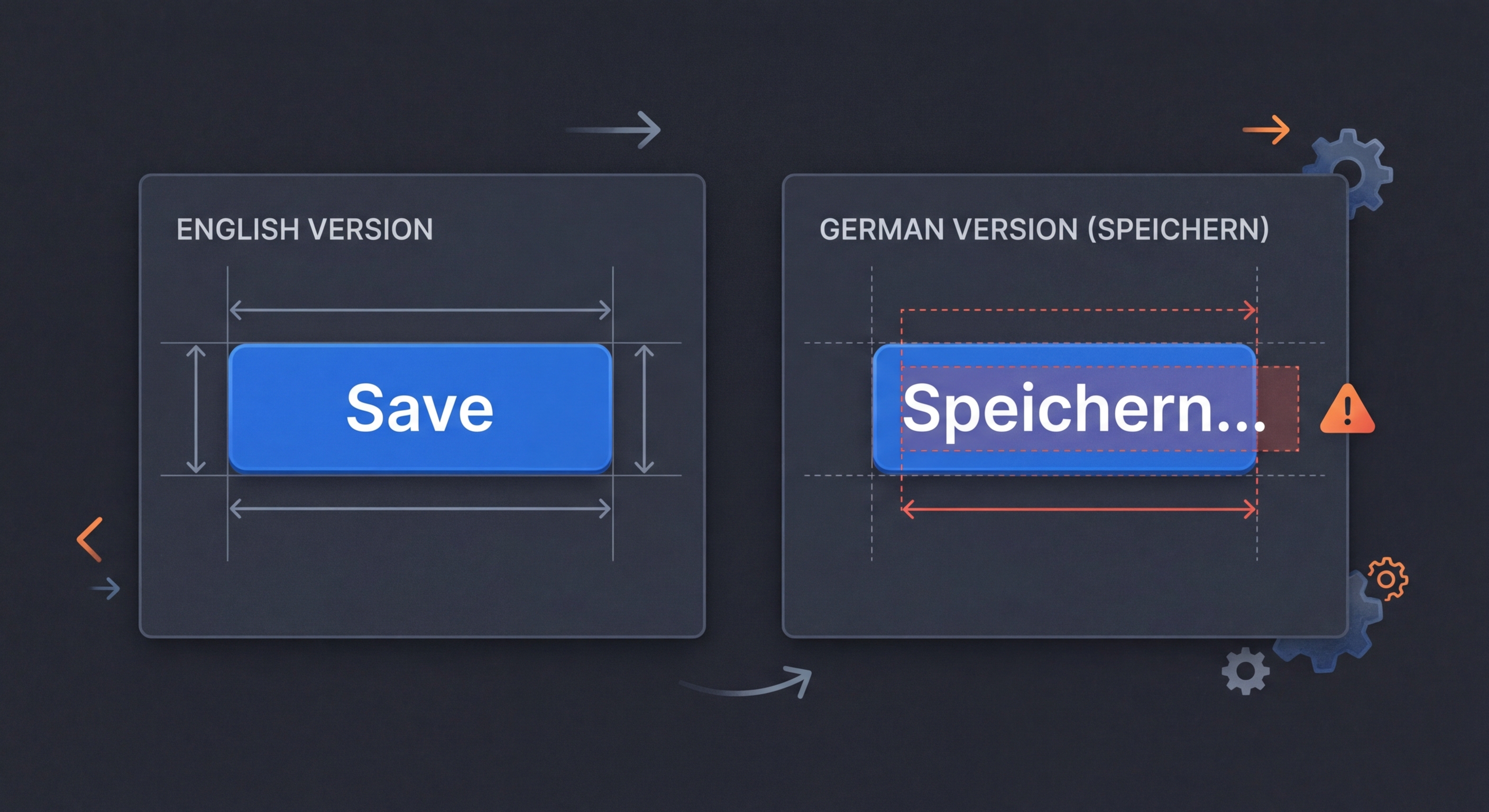
i18n में टेक्स्ट विस्तार: ट्रांसलेशन की लंबाई से लेआउट बिगड़ने से रोकें
आपका अंग्रेज़ी UI बिल्कुल सही बैठता है। फिर जर्मन ट्रांसलेशन आते हैं—30% अधिक लंबे। फ़िनिश 40% अधिक लंबी होती है। आपके बटन ओवरफ़्लो होने लगते हैं, टेबल बिगड़ जाती हैं और सावधानी से बनाया गया लेआउट बिखर जाता है। टेक्स्ट विस्तार परीक्षण इसे रोकता है।
टेक्स्ट विस्तार से लेआउट क्यों बिगड़ते हैं
डेवलपर अंग्रेज़ी टेक्स्ट के साथ UI डिज़ाइन करते हैं, जबकि अंग्रेज़ी सबसे संक्षिप्त भाषाओं में से एक है। ट्रांसलेशन आने पर अधिक लंबी भाषाओं का टेक्स्ट कंटेनर से बाहर निकल जाता है, ग्रिड लेआउट बिगाड़ता है, बटन लेबल काट देता है और कॉन्टेंट को स्क्रीन से बाहर धकेल देता है। ये बग केवल कुछ लोकेल में दिखाई देते हैं, इसलिए केवल अंग्रेज़ी में होने वाले डेवलपमेंट और परीक्षण के दौरान नज़र नहीं आते।
// English is one of the most compact languages.
// Translations are almost always LONGER.

// English (source):
"Save"           // 4 chars

// Translations:
"Speichern"      // German: 10 chars (+150%)
"Enregistrer"    // French: 12 chars (+200%)
"Guardar"        // Spanish: 7 chars (+75%)
"Сохранить"      // Russian: 9 chars (+125%)
"Tallenna"       // Finnish: 8 chars (+100%)

// Buttons, labels, and table headers designed for
// English text WILL break in other languages.भाषा के अनुसार टेक्स्ट विस्तार अनुपात
अंग्रेज़ी स्रोत टेक्स्ट की तुलना में औसत विस्तार अनुपात। छोटी स्ट्रिंग (20 से कम वर्ण) लंबी स्ट्रिंग की तुलना में अधिक फैलती हैं, क्योंकि किसी एक शब्द का चयन भी कुल लंबाई पर अधिक प्रभाव डालता है।
// Average text expansion relative to English:

// European languages:
// German:     +30-35%  (compound words)
// Finnish:    +30-40%  (agglutinative)
// French:     +15-25%  (articles, prepositions)
// Spanish:    +15-25%
// Italian:    +15-25%
// Portuguese: +15-25%
// Russian:    +20-30%  (case endings)
// Polish:     +20-30%
// Greek:      +20-30%

// Asian languages (CJK):
// Chinese:    -30-50%  (shorter in characters, but wider per char)
// Japanese:   -20-40%  (kanji compress meaning)
// Korean:     -10-20%

// Right-to-left:
// Arabic:     +20-30%
// Hebrew:     +10-20%

// Rule of thumb by source string length:
// 1-10 chars:   expect +200% expansion
// 11-20 chars:  expect +80% expansion
// 21-70 chars:  expect +40% expansion
// 71+ chars: expect +30% expansioni18n-pseudo के साथ परीक्षण
i18n-pseudo की विस्तार रणनीति ट्रांसलेशन की लंबाई का अनुकरण करने के लिए आपकी स्रोत स्ट्रिंग में अतिरिक्त वर्ण जोड़ती है। विस्तार अनुपात को अपनी लक्ष्य भाषाओं के अनुसार तय करें और वास्तविक ट्रांसलेशन आने से पहले अपने लेआउट जाँचें।
# Method 1: Pseudo-localization with expansion
npx i18n-pseudo generate \
  --source locales/en.json \
  --output locales/pseudo-expanded.json \
  --expansion 1.4 \
  --preset expanded

# Method 2: Longest-translation analysis
npx i18n-validate expansion \
  --source locales/en.json \
  --targets 'locales/*.json' \
  --report expansion-report.json

# Output:
# Key                  | EN  | Longest | Lang | Ratio
# ---------------------|-----|---------|------|-------
# nav.settings         | 8   | 14      | de   | 175%
# buttons.save         | 4   | 12      | fr   | 300%
# errors.networkFailed | 14  | 28      | fi   | 200%

# Method 3: Visual regression with expanded text
npx playwright test \
  --project=expansion-test \
--update-snapshots// playwright.config.ts
export default defineConfig({
projects: [
{
name: 'expansion-test',
use: {
locale: 'pseudo-expanded',
},
},
],
});
// tests/expansion.spec.ts
test('buttons do not overflow with expanded text', async ({ page }) => {
await page.goto('/');
// Check no horizontal overflow
const buttons = await page.locator('button').all();
for (const button of buttons) {
const box = await button.boundingBox();
const parent = await button.locator('..').boundingBox();
expect(box!.x + box!.width).toBeLessThanOrEqual(
parent!.x + parent!.width
);
}
// Visual snapshot comparison
await expect(page).toHaveScreenshot('homepage-expanded.png', {
maxDiffPixels: 100,
});
});i18n के लिए डिज़ाइन की सर्वोत्तम प्रक्रियाएँ
टेक्स्ट विस्तार संभालने वाले लेआउट बनाने के लिए ट्रांसलेशन का काम शुरू होने से पहले ही डिज़ाइन संबंधी निर्णय लेने पड़ते हैं। ये प्रक्रियाएँ विस्तार से जुड़े सबसे आम बग रोकती हैं।
/* 1. Use flexible containers, not fixed widths */
/* WRONG */
.button { width: 120px; }

/* RIGHT */
.button { min-width: 80px; padding: 8px 16px; }

/* 2. Allow text wrapping in labels */
/* WRONG */
.label { white-space: nowrap; overflow: hidden; }

/* RIGHT */
.label { overflow-wrap: break-word; }

/* 3. Use CSS Grid/Flexbox for adaptive layouts */
.nav {
  display: flex;
  flex-wrap: wrap;
  gap: 8px;
}

/* 4. Reserve space for the longest expected translation */
/* Use min-width based on ~1.4x English length */
.table-header {
  min-width: max-content;
  padding-right: 16px;
}

/* 5. Test with the longest language first */
/* German and Finnish are good stress-test languages */

/* 6. For CJK: account for wider characters */
/* CJK characters are typically 2x the width of Latin chars */
/* Even though text is shorter, it may be wider visually */i18n Agent अभी आज़माएँ
अपनी अनुवाद फ़ाइल यहाँ छोड़ें
JSON, YAML, PO, XML, CSV, Markdown, Properties
या ब्राउज़ करने के लिए क्लिक करें
लक्षित भाषाएँ