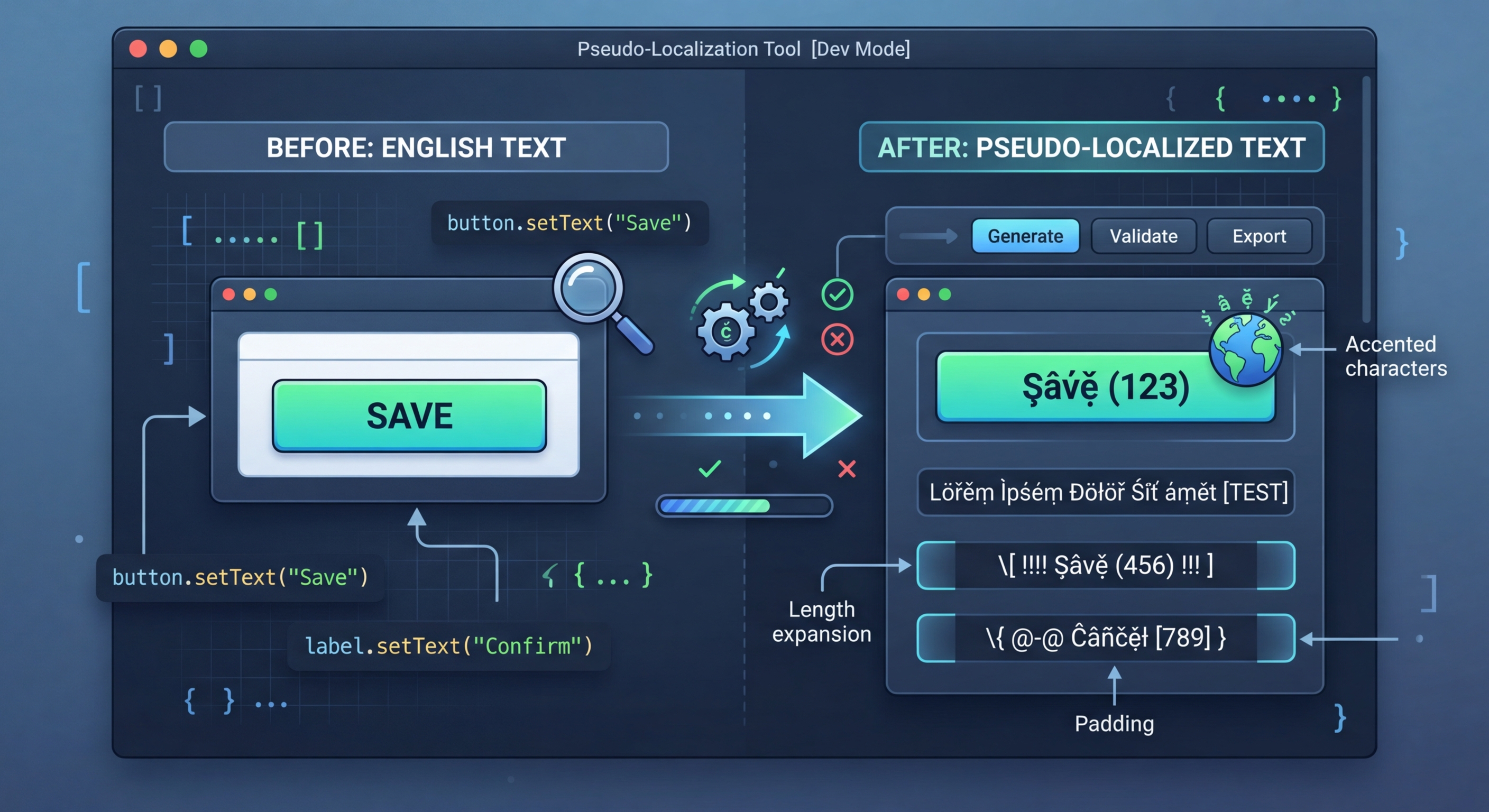
의사 현지화: 실제 번역 없이 i18n 준비 상태 테스트
실제 번역에는 시간과 비용이 들어요. 의사 현지화는 원본 문자열을 읽을 수 있지만 명백히 가짜인 텍스트로 바꿔 하드코딩된 문자열, 텍스트 넘침, RTL 문제, 문자열 연결 문제 같은 i18n 버그를 즉시 드러내요.
의사 현지화란?
의사 현지화는 원본 문자열의 문자를 모양이 비슷한 악센트 문자나 확장 문자로 바꾸고 텍스트 확장 패딩을 추가하며 문자열을 대괄호로 감싸요. 결과는 개발자가 읽을 수 있지만 실제 텍스트와는 확연히 달라서 번역 함수를 거치지 않은 문자열을 쉽게 찾을 수 있어요.
// Pseudo-localization transforms your source strings
// to simulate translation without real translators

// Original:
"Welcome to our application"

// Accented (simulates diacritics):
"[Ẁëľčöṁë ţö öüŕ àṗṗľïčàţïöñ]"

// Expanded (simulates text expansion ~30%):
"[Weeelcooomee tooo ouuur aaappliiicaaatiiioon]"

// Mirrored (simulates RTL layout):
"[noitacilppa ruo ot emocleW]"

// Brackets make untranslated strings immediately visible프로젝트에서 사용
i18n-pseudo를 설치하고 로케일 파일을 대상으로 실행하세요. 도구가 파일 형식을 자동으로 감지하고 앱에서 테스트 로케일로 로드할 수 있는 의사 현지화 버전을 생성해요.
// 1. Hardcoded strings (not wrapped in t())
// Pseudo strings have brackets/accents, so untranslated
// strings are immediately obvious in the UI

// 2. Text truncation
// Expanded text reveals buttons and labels that break
// when translations are longer than English

// 3. Layout issues
// Accented characters reveal font rendering problems
// RTL mode reveals directional layout bugs

// 4. Concatenation bugs
// "Hello " + name vs t('greeting', { name })
// Pseudo-localization breaks concatenated strings

// 5. Missing i18n wrappers
// Any string not going through the i18n system
// appears as plain English among pseudo text7가지 변환 전략
i18n-pseudo는 i18n 구현의 서로 다른 측면을 테스트하는 7가지 변환 전략을 제공해요. 특정 항목을 테스트할 때는 개별적으로 사용하고 포괄적으로 검사할 때는 프리셋으로 결합하세요.
// Strategy 1: Accented characters
// Replace ASCII with similar-looking Unicode
// a -> à, e -> ë, o -> ö, etc.
// Preserves readability while testing rendering

// Strategy 2: Text expansion
// Pad strings to simulate longer translations
// German is ~30% longer, Finnish ~40% longer
// Helps catch UI overflow early

// Strategy 3: Brackets/wrappers
// Wrap strings in [brackets] or «guillemets»
// Makes untranslated strings visually obvious

// Strategy 4: Bidi/RTL
// Mirror text for right-to-left testing
// Catches layout issues before Arabic/Hebrew testing

// Strategy 5: Combined
// Apply all strategies simultaneously
// Maximum coverage in one pass5가지 내장 프리셋
프리셋은 여러 전략을 자주 필요한 설정으로 결합해요. 빠른 테스트에는 프리셋을 사용하고 고유한 요구 사항에는 사용자 지정 조합을 만드세요.
// Using i18n-pseudo CLI
npx i18n-pseudo generate \
  --source locales/en.json \
  --output locales/pseudo.json \
  --preset accented

# Available presets:
# accented  - Ḣëľľö Ẁöŕľð (default)
# expanded  - Heeellooo Wooorld
# mirrored  - dlroW olleH
# brackets  - [Hello World]
# maximum   - [Ḣëëëľľľöööö Ẁöööŕŕŕľľľðððð]

// i18n-pseudo.config.json
{
  "source": "locales/en.json",
  "output": "locales/pseudo.json",
  "preset": "maximum",
  "expansion": 1.4,
  "wrapper": ["[", "]"],
  "exclude": [
    "*.url",
    "*.email",
    "branding.*"
  ]
}CI/CD 통합
CI에서 의사 현지화를 실행해 i18n 회귀를 자동으로 찾아내세요. 의사 현지화 파일을 생성하고 주요 화면을 렌더링한 다음 기준 스크린샷과 비교하세요. 스크린샷에 변환되지 않은 텍스트가 있다면 번역 함수를 우회한 새 하드코딩 문자열이 추가된 회귀예요.
# .github/workflows/pseudo-check.yml
name: Pseudo-Localization Check

on:
  pull_request:
    paths:
      - 'src/**'

jobs:
  pseudo-test:
    runs-on: ubuntu-latest
    steps:
      - uses: actions/checkout@v4

      - name: Setup Node.js
        uses: actions/setup-node@v4
        with:
          node-version: 20

      - name: Install dependencies
        run: npm ci

      - name: Generate pseudo locale
        run: npx i18n-pseudo generate \
          --source locales/en.json \
          --output locales/pseudo.json \
          --preset maximum

      - name: Build with pseudo locale
        run: npm run build
        env:
          NEXT_PUBLIC_LOCALE: pseudo

      - name: Run visual regression tests
        run: npx playwright test --project=pseudo
        env:
LOCALE: pseudo지금 i18n Agent 사용해 보기
번역 파일을 여기에 드롭
JSON, YAML, PO, XML, CSV, Markdown, Properties
또는 클릭하여 파일 선택
대상 언어