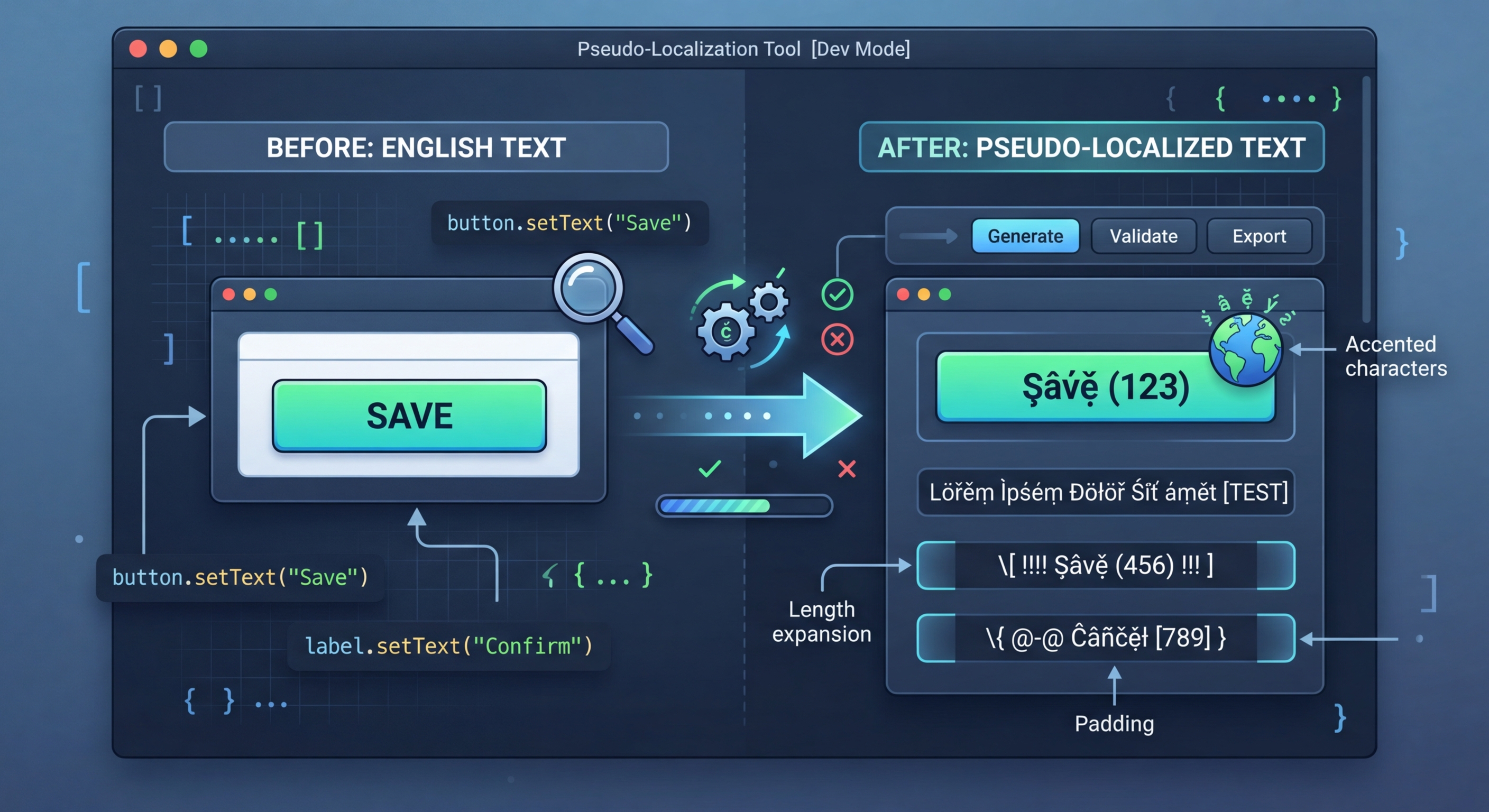
Sözde yerelleştirme: Gerçek çeviriler olmadan i18n hazırlığını test edin
Gerçek çeviriler zaman ve para gerektirir. Sözde yerelleştirme, kaynak dizelerinizi okunabilir ancak açıkça sahte metne dönüştürerek sabit kodlanmış dizeler, metin taşmaları, RTL sorunları ve birleştirme problemleri gibi i18n hatalarını anında ortaya çıkarır.
Sözde yerelleştirme nedir?
Sözde yerelleştirme, kaynak dizelerinizdeki karakterleri görsel olarak benzer aksanlı veya genişletilmiş karakterlerle değiştirir, metin genişletme dolgusu ekler ve dizeleri köşeli ayraç içine alır. Sonuç geliştiriciler tarafından okunabilir kalırken gerçek metinden açıkça farklı görünür; böylece çeviri işlevleriyle sarmalanmamış dizeleri fark etmek son derece kolaylaşır.
// Pseudo-localization transforms your source strings
// to simulate translation without real translators

// Original:
"Welcome to our application"

// Accented (simulates diacritics):
"[Ẁëľčöṁë ţö öüŕ àṗṗľïčàţïöñ]"

// Expanded (simulates text expansion ~30%):
"[Weeelcooomee tooo ouuur aaappliiicaaatiiioon]"

// Mirrored (simulates RTL layout):
"[noitacilppa ruo ot emocleW]"

// Brackets make untranslated strings immediately visibleProjenizde kullanım
i18n-pseudo'yu kurun ve yerel ayar dosyalarınız üzerinde çalıştırın. Araç dosya biçimini otomatik olarak algılar ve uygulamanızda test yerel ayarı olarak yükleyebileceğiniz sözde yerelleştirilmiş bir sürüm oluşturur.
// 1. Hardcoded strings (not wrapped in t())
// Pseudo strings have brackets/accents, so untranslated
// strings are immediately obvious in the UI

// 2. Text truncation
// Expanded text reveals buttons and labels that break
// when translations are longer than English

// 3. Layout issues
// Accented characters reveal font rendering problems
// RTL mode reveals directional layout bugs

// 4. Concatenation bugs
// "Hello " + name vs t('greeting', { name })
// Pseudo-localization breaks concatenated strings

// 5. Missing i18n wrappers
// Any string not going through the i18n system
// appears as plain English among pseudo text7 dönüştürme stratejisi
i18n-pseudo, i18n uygulamanızın farklı bir yönünü test eden 7 dönüştürme stratejisi sunar. Hedefli testler için bunları ayrı ayrı kullanabilir veya kapsamlı testler için ön ayarlarla birleştirebilirsiniz.
// Strategy 1: Accented characters
// Replace ASCII with similar-looking Unicode
// a -> à, e -> ë, o -> ö, etc.
// Preserves readability while testing rendering

// Strategy 2: Text expansion
// Pad strings to simulate longer translations
// German is ~30% longer, Finnish ~40% longer
// Helps catch UI overflow early

// Strategy 3: Brackets/wrappers
// Wrap strings in [brackets] or «guillemets»
// Makes untranslated strings visually obvious

// Strategy 4: Bidi/RTL
// Mirror text for right-to-left testing
// Catches layout issues before Arabic/Hebrew testing

// Strategy 5: Combined
// Apply all strategies simultaneously
// Maximum coverage in one pass5 yerleşik ön ayar
Ön ayarlar, birden fazla stratejiyi sık kullanılan yapılandırmalarda birleştirir. Hızlı test için bir ön ayar kullanabilir veya özel ihtiyaçlarınıza göre kendi birleşimlerinizi oluşturabilirsiniz.
// Using i18n-pseudo CLI
npx i18n-pseudo generate \
  --source locales/en.json \
  --output locales/pseudo.json \
  --preset accented

# Available presets:
# accented  - Ḣëľľö Ẁöŕľð (default)
# expanded  - Heeellooo Wooorld
# mirrored  - dlroW olleH
# brackets  - [Hello World]
# maximum   - [Ḣëëëľľľöööö Ẁöööŕŕŕľľľðððð]

// i18n-pseudo.config.json
{
  "source": "locales/en.json",
  "output": "locales/pseudo.json",
  "preset": "maximum",
  "expansion": 1.4,
  "wrapper": ["[", "]"],
  "exclude": [
    "*.url",
    "*.email",
    "branding.*"
  ]
}CI/CD tümleştirmesi
i18n gerilemelerini otomatik olarak tespit etmek için sözde yerelleştirmeyi CI'da çalıştırın. Sözde yerelleştirilmiş dosyalar oluşturun, temel ekranları görüntüleyin ve referans ekran görüntüleriyle karşılaştırın. Ekran görüntülerindeki dönüştürülmemiş her metin, çeviri işlevini atlayan yeni bir sabit kodlanmış dizeyi gösteren gerilemedir.
# .github/workflows/pseudo-check.yml
name: Pseudo-Localization Check

on:
  pull_request:
    paths:
      - 'src/**'

jobs:
  pseudo-test:
    runs-on: ubuntu-latest
    steps:
      - uses: actions/checkout@v4

      - name: Setup Node.js
        uses: actions/setup-node@v4
        with:
          node-version: 20

      - name: Install dependencies
        run: npm ci

      - name: Generate pseudo locale
        run: npx i18n-pseudo generate \
          --source locales/en.json \
          --output locales/pseudo.json \
          --preset maximum

      - name: Build with pseudo locale
        run: npm run build
        env:
          NEXT_PUBLIC_LOCALE: pseudo

      - name: Run visual regression tests
        run: npx playwright test --project=pseudo
        env:
LOCALE: pseudoi18n Agent'ı şimdi deneyin
Çeviri dosyanızı buraya bırakın
JSON, YAML, PO, XML, CSV, Markdown, Properties
veya göz atmak için tıklayın
Hedef diller