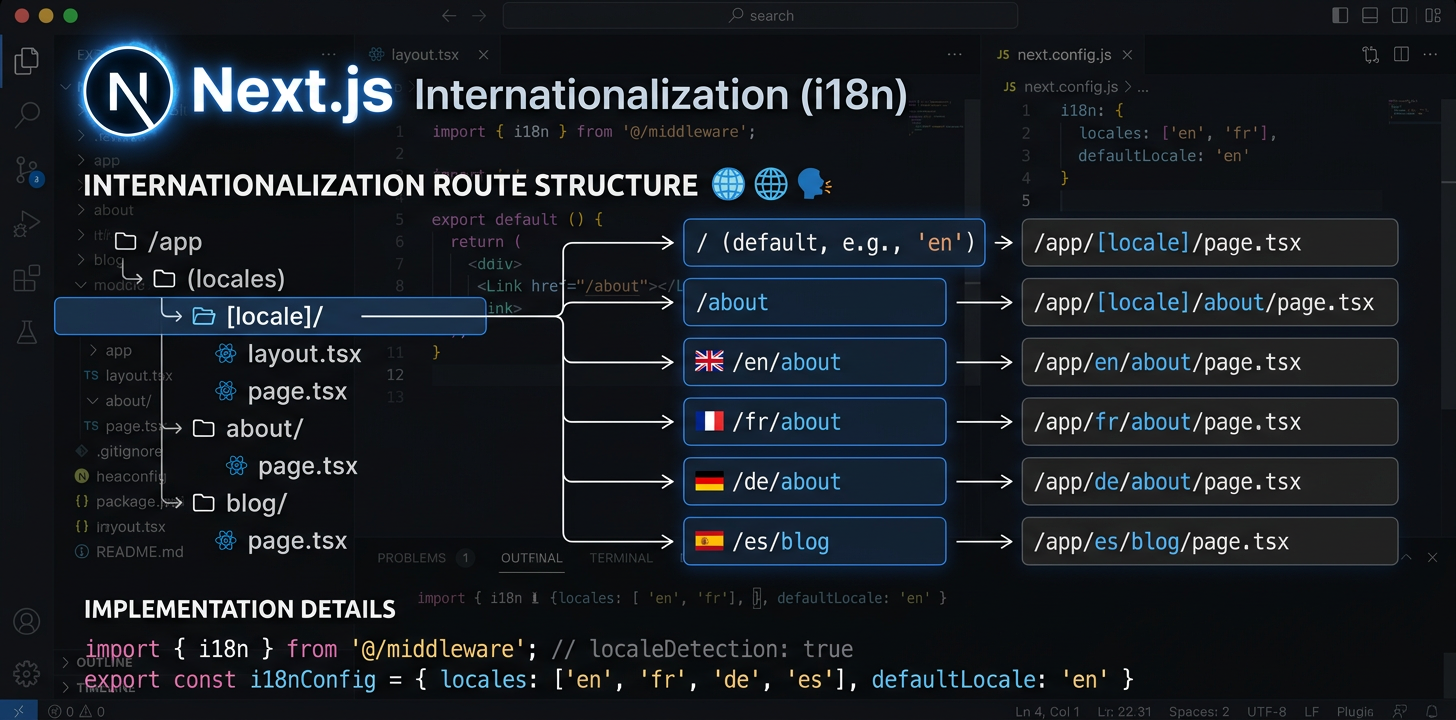
คู่มือการทำให้ Next.js รองรับหลายภาษาอย่างครบถ้วน
ตั้งค่า next-intl กับ App Router กำหนดค่าเส้นทางตามภาษา แล้วทำให้การแปลเป็นอัตโนมัติด้วย AI
ติดตั้ง next-intl
next-intl เป็นแพ็กเกจเดียวที่จัดการเส้นทางตามภาษา การโหลดข้อความ และฮุกคำแปลสำหรับ Next.js App Router
npm install next-intlสร้างการกำหนดค่าคำขอ i18n
สร้างสองไฟล์ ได้แก่ src/i18n/request.ts สำหรับโหลดข้อความ และ src/i18n/routing.ts สำหรับกำหนดภาษา ไฟล์เหล่านี้กำหนดวิธีที่ next-intl ค้นหาข้อความและเส้นทาง
// src/i18n/routing.ts
import { defineRouting } from 'next-intl/routing';
import { createNavigation } from 'next-intl/navigation';

export const routing = defineRouting({
  locales: ['en', 'de', 'ja', 'es'],
  defaultLocale: 'en',
  localePrefix: 'as-needed',  // /about for en, /de/about for de
});

export const { Link, redirect, usePathname, useRouter } =
createNavigation(routing);กำหนดค่ามิดเดิลแวร์
เพิ่ม middleware.ts เพื่อจัดการการตรวจหาภาษา การเขียน URL ใหม่ และการเปลี่ยนเส้นทาง มิดเดิลแวร์จะดักทุกคำขอและตรวจให้ใช้ภาษาที่ถูกต้อง
// middleware.ts  <- Must be in project ROOT, not src/
import createMiddleware from 'next-intl/middleware';
import { routing } from './src/i18n/routing';

export default createMiddleware(routing);

export const config = {
  matcher: ['/((?!api|_next|.*\\..*).*)'],
};ตั้งค่าโครงสร้างโฟลเดอร์ [locale]
ย้ายเส้นทางแอปไปไว้ใน app/[locale]/ เพิ่ม generateStaticParams เพื่อสร้างหน้าสำหรับแต่ละภาษาขณะบิลด์ วิธีนี้สร้างโครงสร้าง URL อย่าง /en/about, /de/about และอื่นๆ
// app/[locale]/layout.tsx
import { routing } from '@/i18n/routing';

export function generateStaticParams() {
  return routing.locales.map((locale) => ({ locale }));
}อัปเดตเลย์เอาต์ราก
โหลดข้อความด้วย getMessages() แล้วส่งให้ NextIntlClientProvider ในเลย์เอาต์ภาษาราก ตั้งค่าแอตทริบิวต์ lang ของ html จากพารามิเตอร์ภาษา
// app/[locale]/layout.tsx
import { NextIntlClientProvider } from 'next-intl';
import { getMessages, setRequestLocale } from 'next-intl/server';
import { routing } from '@/i18n/routing';
import { notFound } from 'next/navigation';

export function generateStaticParams() {
  return routing.locales.map((locale) => ({ locale }));
}

export default async function LocaleLayout({
  children,
  params,
}: {
  children: React.ReactNode;
  params: { locale: string };
}) {
  const { locale } = await params;
  if (!routing.locales.includes(locale as any)) notFound();

  setRequestLocale(locale);
  const messages = await getMessages();

  return (
    <html lang={locale}>
      <body>
        <NextIntlClientProvider locale={locale} messages={messages}>
          {children}
        </NextIntlClientProvider>
      </body>
    </html>
  );
}ใช้คำแปลในคอมโพเนนต์
คอมโพเนนต์เซิร์ฟเวอร์ใช้ getTranslations (อะซิงโครนัสและใช้ await) ส่วนคอมโพเนนต์ไคลเอ็นต์ใช้ useTranslations (ฮุก) ให้เลือกตามตำแหน่งที่คอมโพเนนต์เรนเดอร์ คอมโพเนนต์เซิร์ฟเวอร์จะกันคำแปลออกจากชุด JavaScript ทั้งหมด
// Server Component (default)
import { getTranslations, setRequestLocale } from 'next-intl/server';

export default async function AboutPage({
  params,
}: { params: { locale: string } }) {
  const { locale } = await params;
  setRequestLocale(locale);
  const t = await getTranslations('AboutPage');

  return <h1>{t('title')}</h1>;
}

// Client Component ('use client')
'use client';
import { useTranslations } from 'next-intl';

export default function SearchBar() {
  const t = useTranslations('SearchBar');
  return <input placeholder={t('placeholder')} />;
}เพิ่ม SEO : เมทาดาทาและ Hreflang
ใช้ generateMetadata เพื่อสร้างชื่อหน้าและคำอธิบายเฉพาะภาษา เพิ่ม alternates.languages สำหรับแท็ก hreflang เพื่อให้เครื่องมือค้นหาพบทุกเวอร์ชันภาษาของทุกหน้า
// app/[locale]/layout.tsx or any page.tsx
import { getTranslations } from 'next-intl/server';
import { routing } from '@/i18n/routing';

export async function generateMetadata({
  params,
}: { params: { locale: string } }) {
  const { locale } = await params;
  const t = await getTranslations({ locale, namespace: 'Metadata' });

  return {
    title: t('title'),
    description: t('description'),
    alternates: {
      languages: Object.fromEntries(
        routing.locales.map((l) => [l, `/${l}`])
      ),
    },
  };
}จัดการหน้าข้อผิดพลาดและไม่พบหน้า
error.tsx และ not-found.tsx ต้องจัดการเป็นพิเศษ เพราะอาจเรนเดอร์นอกเลย์เอาต์ภาษาปกติ not-found.tsx ที่รากต้องมีการตั้งค่าผู้ให้บริการ i18n ของตัวเองเพื่อแสดงข้อความข้อผิดพลาดฉบับโลคัลไลซ์
// app/[locale]/error.tsx
'use client';
import { useTranslations } from 'next-intl';

export default function Error() {
  const t = useTranslations('Error');
  return (
    <div>
      <h1>{t('title')}</h1>
      <p>{t('description')}</p>
    </div>
  );
}

// app/not-found.tsx (root level -- needs own provider)
import { routing } from '@/i18n/routing';

export default async function GlobalNotFound() {
  return (
    <html lang={routing.defaultLocale}>
      <body>
        <h1>404 - Page Not Found</h1>
      </body>
    </html>
  );
}ทำให้การแปลเป็นอัตโนมัติ
เมื่อตั้งค่า i18n เสร็จแล้ว ให้แปลไฟล์ข้อความด้วย AI จาก IDE โดยตรง หรือใช้ CLI ของ i18n Agent ในไปป์ไลน์ CI/CD เพื่อแปลอัตโนมัติทุกครั้งที่ดีพลอย
# In your IDE, ask your AI assistant:
> Translate messages/en.json to German, Japanese, and Spanish

✓ messages/de.json created (1.1s)
✓ messages/ja.json created (1.4s)
✓ messages/es.json created (1.0s)ทำให้คุณภาพการแปลเป็นอัตโนมัติ
เครื่องมือโอเพนซอร์สสำหรับ Next.js i18n
แพ็กเกจโอเพนซอร์สเหล่านี้แก้ปัญหาที่พบบ่อยในเวิร์กโฟลว์การทำให้ Next.js รองรับหลายภาษา
next-intl-localechain
next-intl มาตรฐานจะถอยไปใช้ภาษาเริ่มต้นทันทีเมื่อไม่มีคำแปล ผู้ใช้ภาษาโปรตุเกสบราซิลจึงเห็นภาษาอังกฤษแทนคำแปล pt-PT ที่ใช้ได้ดี next-intl-localechain เพิ่มลำดับการใช้ภาษาสำรองอัจฉริยะ โดยผสานคำแปลเชิงลึกจากภาษาที่เกี่ยวข้อง เพื่อให้ผู้ใช้แต่ละภูมิภาคเห็นคำแปลที่ใกล้เคียงที่สุดเสมอ
import { getRequestConfig } from 'next-intl/server';
import { withLocaleChain } from 'next-intl-localechain';

export default getRequestConfig(withLocaleChain({
  loadMessages: (locale) =>
    import(`../../messages/${locale}.json`).then(m => m.default),
  defaultLocale: 'en'
}));@i18n-agent/cli
เครื่องมือบรรทัดคำสั่งสำหรับแปลไฟล์ข้อความ Next.js โดยไม่ออกจากเทอร์มินัล แปลไฟล์โดยตรง ตรวจสถานะงาน และดาวน์โหลดผลลัพธ์ ใช้งานในไปป์ไลน์ CI/CD พร้อมการยืนยันตัวตนด้วยคีย์ API สำหรับเวิร์กโฟลว์โลคัลไลเซชันอัตโนมัติเต็มรูปแบบ
# Install the CLI
npm install -g @i18n-agent/cli

# Authenticate
i18nagent login

# Translate your message files
i18nagent translate ./messages/en.json --lang de,ja,es

# Or use in CI/CD with an API key
export I18N_AGENT_API_KEY=your-key-here
i18nagent translate ./messages/en.json --lang de,ja,esข้อผิดพลาดที่พบบ่อย
“Unable to find next-intl locale”
มิดเดิลแวร์ไม่ตรงกับคำขอ ให้ตรวจว่า middleware.ts อยู่ในรากโปรเจกต์หรือไม่ รูปแบบ matcher ไม่รวมไฟล์คงที่อย่างถูกต้องหรือไม่ และภาษาอยู่ในการกำหนดค่าเส้นทางหรือไม่
เรนเดอร์แบบไดนามิกโดยไม่คาดคิด
ไม่มี setRequestLocale(locale) ในหน้าหรือเลย์เอาต์ หากไม่มี next-intl จะใช้ส่วนหัว/คุกกี้ตรวจหาภาษา ซึ่งบังคับให้เรนเดอร์แบบไดนามิกและป้องกันการสร้างแบบสถิต
เส้นทางขนานใช้งานไม่ได้กับ i18n
เส้นทางขนาน (@modal) และเส้นทางดัก ((.)photo) มีปัญหาความเข้ากันได้ที่ทราบกับเซกเมนต์ไดนามิก [locale] ให้ใช้การกำหนดเส้นทางผ่านมิดเดิลแวร์เป็นทางแก้สำหรับรูปแบบเส้นทางขั้นสูงเหล่านี้
การสลับภาษาทำให้เส้นทางปัจจุบันหาย
เมื่อสลับภาษา ให้รักษา pathname ปัจจุบันด้วย usePathname() และแทนที่เฉพาะเซกเมนต์ภาษา ระวังพารามิเตอร์เส้นทางแบบไดนามิก เพราะต้องค้นหาค่าใหม่สำหรับภาษาใหม่
โครงสร้างไฟล์ที่แนะนำ
my-nextjs-app/
├── middleware.ts              # Locale routing (project root!)
├── next.config.mjs
├── messages/
│   ├── en.json                # Source messages
│   ├── de.json
│   └── ja.json
├── src/
│   ├── i18n/
│   │   ├── request.ts         # Message loading config
│   │   └── routing.ts         # Locale definitions
│   └── app/
│       └── [locale]/
│           ├── layout.tsx     # Root locale layout
│           ├── page.tsx       # Home page
│           ├── error.tsx      # Localized error page
│           ├── not-found.tsx  # Localized 404
│           └── about/
│               └── page.tsx
└── package.jsonแปลรายการต่อไปนี้ได้ด้วย :
ลองใช้ i18n Agent ตอนนี้
ลากและวางไฟล์แปลของคุณที่นี่
JSON, YAML, PO, XML, CSV, Markdown, Properties
หรือคลิกเพื่อเลือกไฟล์
ภาษาเป้าหมาย
การใช้ภาษาสำรองด้วย next-intl-localechain
เมื่อไม่มีคีย์คำแปลในภาษาตามภูมิภาคอย่าง pt-BR next-intl จะข้ามไปใช้ภาษาเริ่มต้นทันทีแทนที่จะตรวจภาษาหลัก pt ก่อน
npm install next-intl-localechainimport { withLocaleChain } from 'next-intl-localechain';
export default withLocaleChain({
fallbacks: {
'pt-BR': ['pt', 'en'],
'zh-Hant-HK': ['zh-Hant', 'zh', 'en'],
},
defaultLocale: 'en',
loadMessages: (locale) => import(`./messages/${locale}.json`),
});ดูคู่มือการใช้ภาษาสำรองของเราสำหรับรายการเฟรมเวิร์กที่รองรับทั้งหมดและลำดับสำเร็จรูป 75 รายการ Learn more →