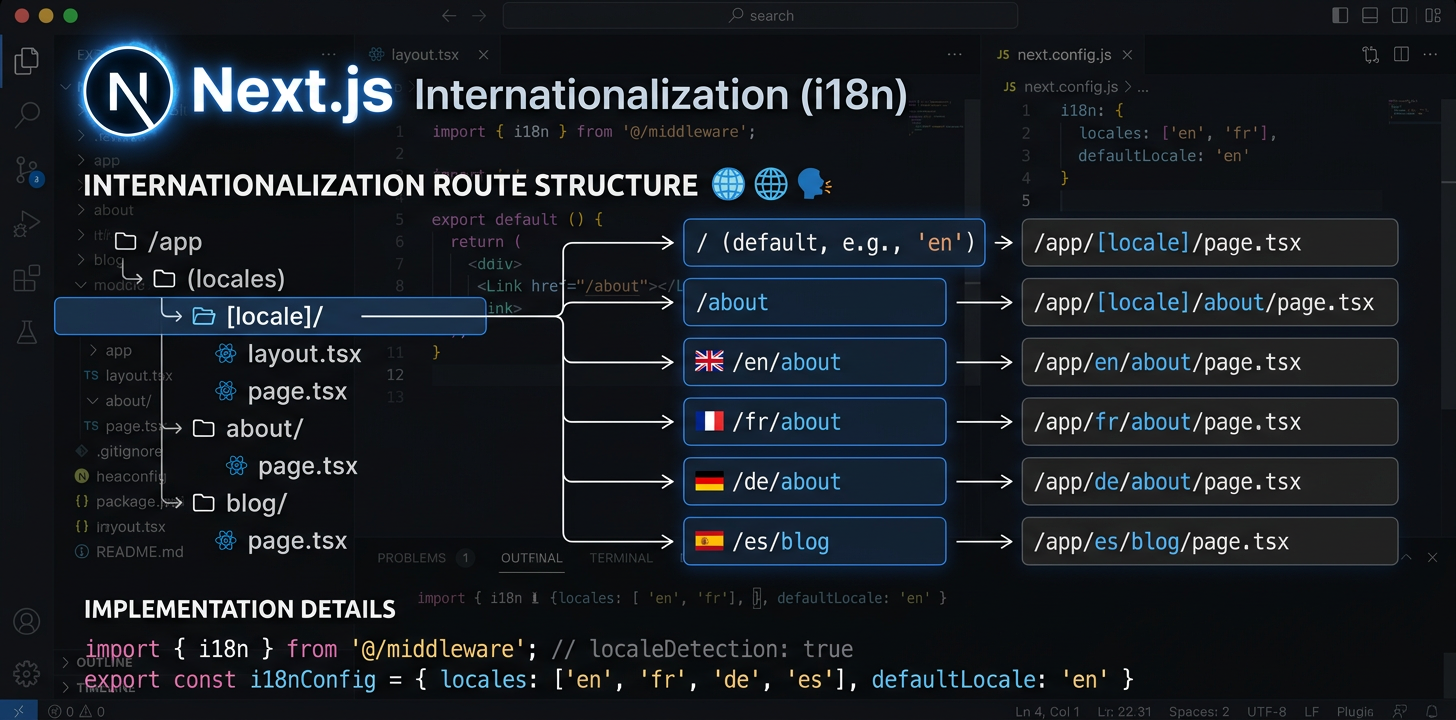
O guia completo da internacionalização em Next.js
Configure next-intl com o App Router, defina o encaminhamento regional e automatize as traduções com IA.
Instalar next-intl
next-intl é um único pacote que trata do encaminhamento regional, do carregamento das mensagens e dos hooks de tradução no App Router do Next.js.
npm install next-intlCriar a configuração de pedidos de i18n
Crie dois ficheiros: src/i18n/request.ts para carregar mensagens e src/i18n/routing.ts para definir regiões. Estes configuram a forma como next-intl resolve mensagens e rotas.
// src/i18n/routing.ts
import { defineRouting } from 'next-intl/routing';
import { createNavigation } from 'next-intl/navigation';

export const routing = defineRouting({
  locales: ['en', 'de', 'ja', 'es'],
  defaultLocale: 'en',
  localePrefix: 'as-needed',  // /about for en, /de/about for de
});

export const { Link, redirect, usePathname, useRouter } =
createNavigation(routing);Configurar o middleware
Adicione middleware.ts para tratar da deteção regional, reescrita de URL e redirecionamentos. O middleware interceta todos os pedidos e garante a aplicação da região correta.
// middleware.ts  <- Must be in project ROOT, not src/
import createMiddleware from 'next-intl/middleware';
import { routing } from './src/i18n/routing';

export default createMiddleware(routing);

export const config = {
  matcher: ['/((?!api|_next|.*\\..*).*)'],
};Configurar a estrutura de pastas [locale]
Mova as rotas da aplicação para app/[locale]/. Adicione generateStaticParams para gerar páginas de cada região durante a compilação. Isto cria a estrutura de URL /en/about, /de/about, etc.
// app/[locale]/layout.tsx
import { routing } from '@/i18n/routing';

export function generateStaticParams() {
  return routing.locales.map((locale) => ({ locale }));
}Atualizar a disposição de raiz
Carregue as mensagens com getMessages() e passe-as para NextIntlClientProvider na disposição regional de raiz. Defina o atributo lang de html a partir do parâmetro regional.
// app/[locale]/layout.tsx
import { NextIntlClientProvider } from 'next-intl';
import { getMessages, setRequestLocale } from 'next-intl/server';
import { routing } from '@/i18n/routing';
import { notFound } from 'next/navigation';

export function generateStaticParams() {
  return routing.locales.map((locale) => ({ locale }));
}

export default async function LocaleLayout({
  children,
  params,
}: {
  children: React.ReactNode;
  params: { locale: string };
}) {
  const { locale } = await params;
  if (!routing.locales.includes(locale as any)) notFound();

  setRequestLocale(locale);
  const messages = await getMessages();

  return (
    <html lang={locale}>
      <body>
        <NextIntlClientProvider locale={locale} messages={messages}>
          {children}
        </NextIntlClientProvider>
      </body>
    </html>
  );
}Utilizar traduções nos componentes
Os componentes de servidor utilizam getTranslations —assíncrono, com await—. Os de cliente utilizam useTranslations —hook—. Escolha conforme o local de apresentação: os componentes de servidor mantêm as traduções totalmente fora do pacote JavaScript do cliente.
// Server Component (default)
import { getTranslations, setRequestLocale } from 'next-intl/server';

export default async function AboutPage({
  params,
}: { params: { locale: string } }) {
  const { locale } = await params;
  setRequestLocale(locale);
  const t = await getTranslations('AboutPage');

  return <h1>{t('title')}</h1>;
}

// Client Component ('use client')
'use client';
import { useTranslations } from 'next-intl';

export default function SearchBar() {
  const t = useTranslations('SearchBar');
  return <input placeholder={t('placeholder')} />;
}Adicionar SEO: metadados e hreflang
Utilize generateMetadata para produzir títulos e descrições de página específicos de cada região. Adicione alternates.languages para etiquetas hreflang, para os motores de pesquisa descobrirem todas as versões linguísticas de cada página.
// app/[locale]/layout.tsx or any page.tsx
import { getTranslations } from 'next-intl/server';
import { routing } from '@/i18n/routing';

export async function generateMetadata({
  params,
}: { params: { locale: string } }) {
  const { locale } = await params;
  const t = await getTranslations({ locale, namespace: 'Metadata' });

  return {
    title: t('title'),
    description: t('description'),
    alternates: {
      languages: Object.fromEntries(
        routing.locales.map((l) => [l, `/${l}`])
      ),
    },
  };
}Tratar páginas de erro e não encontradas
error.tsx e not-found.tsx precisam de tratamento especial porque podem ser apresentados fora da disposição regional normal. O not-found.tsx de raiz precisa da sua própria configuração do fornecedor de i18n para mostrar mensagens de erro localizadas.
// app/[locale]/error.tsx
'use client';
import { useTranslations } from 'next-intl';

export default function Error() {
  const t = useTranslations('Error');
  return (
    <div>
      <h1>{t('title')}</h1>
      <p>{t('description')}</p>
    </div>
  );
}

// app/not-found.tsx (root level -- needs own provider)
import { routing } from '@/i18n/routing';

export default async function GlobalNotFound() {
  return (
    <html lang={routing.defaultLocale}>
      <body>
        <h1>404 - Page Not Found</h1>
      </body>
    </html>
  );
}Automatizar as traduções
Depois de concluir a configuração de i18n, traduza os ficheiros de mensagens com IA diretamente no IDE ou utilize a CLI do i18n Agent no pipeline de CI/CD para automatizar a tradução em cada implementação.
# In your IDE, ask your AI assistant:
> Translate messages/en.json to German, Japanese, and Spanish

✓ messages/de.json created (1.1s)
✓ messages/ja.json created (1.4s)
✓ messages/es.json created (1.0s)Automatizar a qualidade das traduções
Ferramentas de código aberto para i18n no Next.js
Estes pacotes de código aberto resolvem problemas frequentes nos fluxos de internacionalização do Next.js.
next-intl-localechain
O next-intl normal recorre diretamente à região predefinida quando falta uma tradução. Um utilizador de português do Brasil vê inglês em vez de traduções pt-PT perfeitamente válidas. next-intl-localechain acrescenta cadeias de recurso inteligentes: combina profundamente traduções de regiões relacionadas para os utilizadores regionais verem sempre a tradução disponível mais próxima.
import { getRequestConfig } from 'next-intl/server';
import { withLocaleChain } from 'next-intl-localechain';

export default getRequestConfig(withLocaleChain({
  loadMessages: (locale) =>
    import(`../../messages/${locale}.json`).then(m => m.default),
  defaultLocale: 'en'
}));@i18n-agent/cli
Uma ferramenta de linha de comandos para traduzir ficheiros de mensagens do Next.js sem sair do terminal. Traduza diretamente os ficheiros, consulte o estado das tarefas e transfira os resultados. Funciona em pipelines de CI/CD com autenticação por chave de API para fluxos de localização totalmente automatizados.
# Install the CLI
npm install -g @i18n-agent/cli

# Authenticate
i18nagent login

# Translate your message files
i18nagent translate ./messages/en.json --lang de,ja,es

# Or use in CI/CD with an API key
export I18N_AGENT_API_KEY=your-key-here
i18nagent translate ./messages/en.json --lang de,ja,esErros frequentes
«Unable to find next-intl locale»
O middleware não correspondeu ao pedido. Verifique: middleware.ts está na raiz do projeto? O padrão matcher exclui corretamente os ficheiros estáticos? A região está incluída na configuração de encaminhamento?
Apresentação dinâmica inesperada
Falta setRequestLocale(locale) numa página ou disposição. Sem esta chamada, next-intl utiliza cabeçalhos/cookies para detetar a região, o que força a apresentação dinâmica e impede a geração estática.
As rotas paralelas quebram com i18n
As rotas paralelas (@modal) e as rotas intercetadas ((.)photo) têm incompatibilidades conhecidas com o segmento dinâmico [locale]. Utilize encaminhamento baseado em middleware como solução para estes padrões avançados.
A seleção do idioma perde a rota atual
Ao mudar de região, preserve o caminho atual com usePathname() e substitua apenas o segmento regional. Tenha cuidado com os parâmetros de rotas dinâmicas: têm de ser resolvidos novamente para a nova região.
Estrutura de ficheiros recomendada
my-nextjs-app/
├── middleware.ts              # Locale routing (project root!)
├── next.config.mjs
├── messages/
│   ├── en.json                # Source messages
│   ├── de.json
│   └── ja.json
├── src/
│   ├── i18n/
│   │   ├── request.ts         # Message loading config
│   │   └── routing.ts         # Locale definitions
│   └── app/
│       └── [locale]/
│           ├── layout.tsx     # Root locale layout
│           ├── page.tsx       # Home page
│           ├── error.tsx      # Localized error page
│           ├── not-found.tsx  # Localized 404
│           └── about/
│               └── page.tsx
└── package.jsonExperimente já o i18n Agent
Largue aqui o seu ficheiro de tradução
JSON, YAML, PO, XML, CSV, Markdown, Properties
ou clique para selecionar
Idiomas de destino
Recurso regional com next-intl-localechain
Quando falta uma chave de tradução numa região como pt-BR, next-intl passa diretamente para a região predefinida em vez de verificar primeiro a região principal pt.
npm install next-intl-localechainimport { withLocaleChain } from 'next-intl-localechain';
export default withLocaleChain({
fallbacks: {
'pt-BR': ['pt', 'en'],
'zh-Hant-HK': ['zh-Hant', 'zh', 'en'],
},
defaultLocale: 'en',
loadMessages: (locale) => import(`./messages/${locale}.json`),
});Consulte o nosso guia de recurso regional para ver a lista completa de frameworks compatíveis e as 75 cadeias integradas. Learn more →