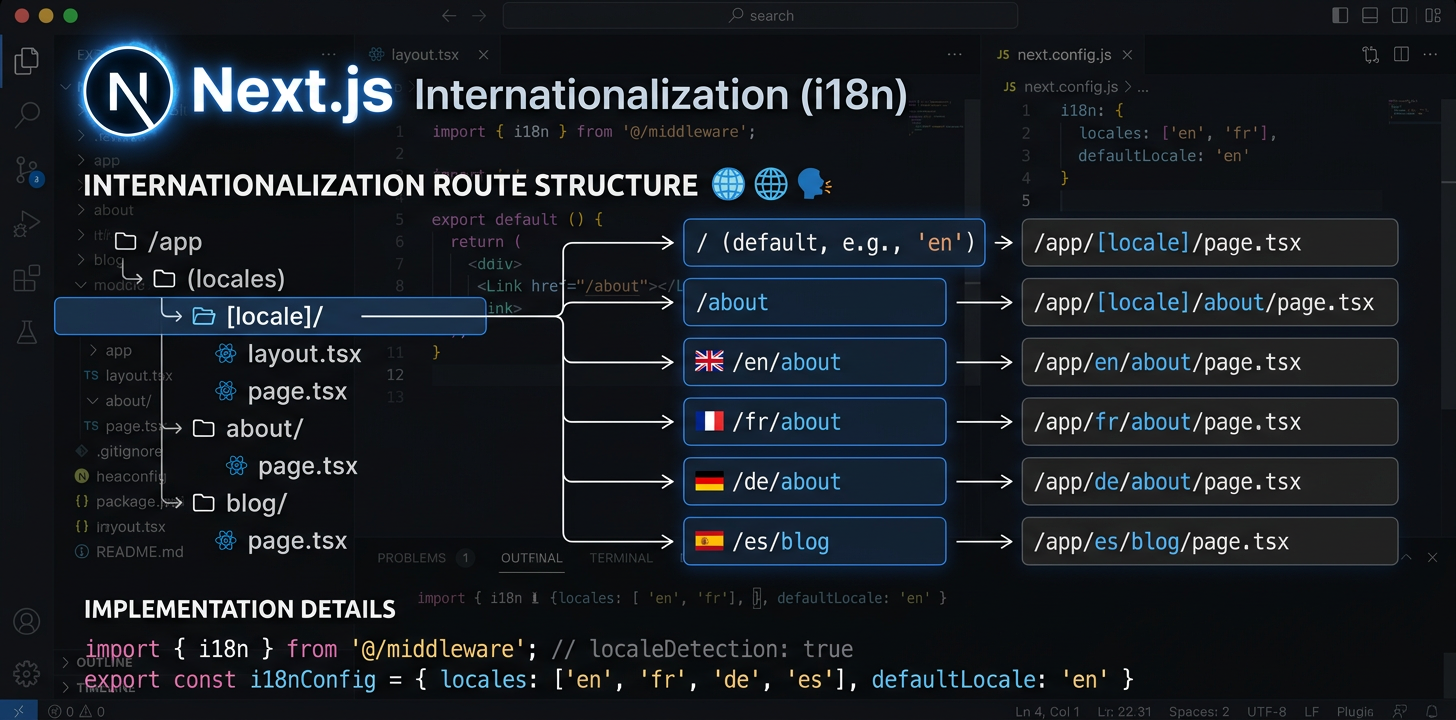
Täielik Next.js-i internatsionaliseerimise juhend
Seadista next-intl App Routeriga, konfigureeri lokaadi marsruutimine ja automatiseeri tõlked tehisintellektiga.
Paigalda next-intl
next-intl on üks pakett, mis haldab Next.js App Routeri lokaadi marsruutimist, sõnumite laadimist ja tõlkehook'e.
npm install next-intlLoo i18n-i päringuseadistus
Loo kaks faili: src/i18n/request.ts sõnumite laadimiseks ja src/i18n/routing.ts lokaatide määratlemiseks. Need seadistavad, kuidas next-intl sõnumeid ja marsruute lahendab.
// src/i18n/routing.ts
import { defineRouting } from 'next-intl/routing';
import { createNavigation } from 'next-intl/navigation';

export const routing = defineRouting({
  locales: ['en', 'de', 'ja', 'es'],
  defaultLocale: 'en',
  localePrefix: 'as-needed',  // /about for en, /de/about for de
});

export const { Link, redirect, usePathname, useRouter } =
createNavigation(routing);Seadista middleware
Lisa middleware.ts lokaadi tuvastamise, URL-ide ümberkirjutamise ja ümbersuunamiste töötlemiseks. Middleware püüab kinni iga päringu ja tagab õige lokaadi rakendamise.
// middleware.ts  <- Must be in project ROOT, not src/
import createMiddleware from 'next-intl/middleware';
import { routing } from './src/i18n/routing';

export default createMiddleware(routing);

export const config = {
  matcher: ['/((?!api|_next|.*\\..*).*)'],
};Seadista [locale] kaustastruktuur
Teisalda rakenduse marsruudid kausta app/[locale]/. Lisa generateStaticParams, et luua ehitamise ajal iga lokaadi lehed. Nii tekib URL-i struktuur /en/about, /de/about jne.
// app/[locale]/layout.tsx
import { routing } from '@/i18n/routing';

export function generateStaticParams() {
  return routing.locales.map((locale) => ({ locale }));
}Värskenda juurpaigutust
Laadi sõnumid funktsiooniga getMessages() ja edasta need lokaadi juurpaigutuse NextIntlClientProviderile. Määra html-elemendi atribuut lang lokaadiparameetri järgi.
// app/[locale]/layout.tsx
import { NextIntlClientProvider } from 'next-intl';
import { getMessages, setRequestLocale } from 'next-intl/server';
import { routing } from '@/i18n/routing';
import { notFound } from 'next/navigation';

export function generateStaticParams() {
  return routing.locales.map((locale) => ({ locale }));
}

export default async function LocaleLayout({
  children,
  params,
}: {
  children: React.ReactNode;
  params: { locale: string };
}) {
  const { locale } = await params;
  if (!routing.locales.includes(locale as any)) notFound();

  setRequestLocale(locale);
  const messages = await getMessages();

  return (
    <html lang={locale}>
      <body>
        <NextIntlClientProvider locale={locale} messages={messages}>
          {children}
        </NextIntlClientProvider>
      </body>
    </html>
  );
}Kasuta tõlkeid komponentides
Serverikomponendid kasutavad getTranslationsi (asünkroonne, await). Kliendikomponendid kasutavad hook'i useTranslations. Vali komponendi renderduskoha järgi — serverikomponendid hoiavad tõlked JavaScript'i paketist täielikult väljas.
// Server Component (default)
import { getTranslations, setRequestLocale } from 'next-intl/server';

export default async function AboutPage({
  params,
}: { params: { locale: string } }) {
  const { locale } = await params;
  setRequestLocale(locale);
  const t = await getTranslations('AboutPage');

  return <h1>{t('title')}</h1>;
}

// Client Component ('use client')
'use client';
import { useTranslations } from 'next-intl';

export default function SearchBar() {
  const t = useTranslations('SearchBar');
  return <input placeholder={t('placeholder')} />;
}Lisa SEO: metaandmed ja hreflang
Loo generateMetadata abil lokaadipõhised lehepealkirjad ja kirjeldused. Lisa hreflang-märgendite jaoks alternates.languages, et otsingumootorid leiaksid iga lehe kõik keeleversioonid.
// app/[locale]/layout.tsx or any page.tsx
import { getTranslations } from 'next-intl/server';
import { routing } from '@/i18n/routing';

export async function generateMetadata({
  params,
}: { params: { locale: string } }) {
  const { locale } = await params;
  const t = await getTranslations({ locale, namespace: 'Metadata' });

  return {
    title: t('title'),
    description: t('description'),
    alternates: {
      languages: Object.fromEntries(
        routing.locales.map((l) => [l, `/${l}`])
      ),
    },
  };
}Töötle tõrke- ja leidmata lehti
error.tsx ja not-found.tsx vajavad erikäsitlust, sest need võivad renderduda tavapärasest lokaadipaigutusest väljaspool. Juurfail not-found.tsx vajab lokaliseeritud veateadete kuvamiseks oma i18n-i pakkuja seadistust.
// app/[locale]/error.tsx
'use client';
import { useTranslations } from 'next-intl';

export default function Error() {
  const t = useTranslations('Error');
  return (
    <div>
      <h1>{t('title')}</h1>
      <p>{t('description')}</p>
    </div>
  );
}

// app/not-found.tsx (root level -- needs own provider)
import { routing } from '@/i18n/routing';

export default async function GlobalNotFound() {
  return (
    <html lang={routing.defaultLocale}>
      <body>
        <h1>404 - Page Not Found</h1>
      </body>
    </html>
  );
}Automatiseeri tõlked
Kui i18n-i seadistus on valmis, tõlgi sõnumifailid tehisintellektiga otse IDE-st või kasuta i18n Agent'i CLI-d oma CI/CD-konveieris, et automatiseerida tõlge igal juurutamisel.
# In your IDE, ask your AI assistant:
> Translate messages/en.json to German, Japanese, and Spanish

✓ messages/de.json created (1.1s)
✓ messages/ja.json created (1.4s)
✓ messages/es.json created (1.0s)Automatiseeri tõlkekvaliteet
Avatud lähtekoodiga tööriistad Next.js i18n-i jaoks
Need avatud lähtekoodiga paketid lahendavad Next.js-i internatsionaliseerimise töövoogude levinud probleeme.
next-intl-localechain
Tavaline next-intl lülitub puuduva tõlke korral otse vaikelokaadile. Brasiilia portugali keele kasutaja näeb täiesti sobivate pt-PT tõlgete asemel inglise keelt. next-intl-localechain lisab nutikad varulokaadiahelad — see süvaühendab seotud lokaatide tõlked, et piirkondlikud kasutajad näeksid alati lähimat saadaolevat tõlget.
import { getRequestConfig } from 'next-intl/server';
import { withLocaleChain } from 'next-intl-localechain';

export default getRequestConfig(withLocaleChain({
  loadMessages: (locale) =>
    import(`../../messages/${locale}.json`).then(m => m.default),
  defaultLocale: 'en'
}));@i18n-agent/cli
Käsureatööriist Next.js-i sõnumifailide tõlkimiseks terminalist lahkumata. Tõlgi faile otse, kontrolli töö olekut ja laadi tulemused alla. Töötab CI/CD-konveierites API-võtmega autentimise abil täielikult automatiseeritud lokaliseerimise töövoogude jaoks.
# Install the CLI
npm install -g @i18n-agent/cli

# Authenticate
i18nagent login

# Translate your message files
i18nagent translate ./messages/en.json --lang de,ja,es

# Or use in CI/CD with an API key
export I18N_AGENT_API_KEY=your-key-here
i18nagent translate ./messages/en.json --lang de,ja,esLevinud komistuskivid
"Unable to find next-intl locale"
Middleware ei sobitunud päringuga. Kontrolli: kas middleware.ts on projekti juurkataloogis? Kas matcher'i muster välistab staatilised failid õigesti? Kas lokaat on sinu marsruutimisseadistuses?
Ootamatu dünaamiline renderdamine
setRequestLocale(locale) puudub lehelt või paigutusest. Ilma selleta kasutab next-intl lokaadi tuvastamiseks päiseid või küpsiseid, mis sunnib kasutama dünaamilist renderdamist ja takistab staatilist loomist.
Paralleelmarsruudid ei tööta i18n-iga
Paralleelmarsruutidel (@modal) ja vaheltlõikavatel marsruutidel ((.)photo) on dünaamilise [locale] segmendiga teadaolevad ühilduvusprobleemid. Kasuta nende keerukate marsruutimismustrite lahendusena middleware-põhist marsruutimist.
Keelevahetus kaotab praeguse marsruudi
Lokaadi vahetamisel säilita praegune rada funktsiooniga usePathname() ja asenda ainult lokaadisegment. Ole dünaamiliste marsruudiparameetritega ettevaatlik — need tuleb uue lokaadi jaoks uuesti lahendada.
Soovituslik failistruktuur
my-nextjs-app/
├── middleware.ts              # Locale routing (project root!)
├── next.config.mjs
├── messages/
│   ├── en.json                # Source messages
│   ├── de.json
│   └── ja.json
├── src/
│   ├── i18n/
│   │   ├── request.ts         # Message loading config
│   │   └── routing.ts         # Locale definitions
│   └── app/
│       └── [locale]/
│           ├── layout.tsx     # Root locale layout
│           ├── page.tsx       # Home page
│           ├── error.tsx      # Localized error page
│           ├── not-found.tsx  # Localized 404
│           └── about/
│               └── page.tsx
└── package.jsonProovi i18n Agent'i kohe
Kukuta tõlkefail siia
JSON, YAML, PO, XML, CSV, Markdown, Properties
või klõpsa faili valimiseks
Sihtkeeled
Varulokaat next-intl-localechainiga
Kui piirkondlikust lokaadist, näiteks pt-BR-st, puudub tõlkevõti, liigub next-intl otse vaikelokaadile ega kontrolli esmalt põhilokaati pt.
npm install next-intl-localechainimport { withLocaleChain } from 'next-intl-localechain';
export default withLocaleChain({
fallbacks: {
'pt-BR': ['pt', 'en'],
'zh-Hant-HK': ['zh-Hant', 'zh', 'en'],
},
defaultLocale: 'en',
loadMessages: (locale) => import(`./messages/${locale}.json`),
});Vaata meie varulokaadi juhendist kõigi toetatud raamistike ja 75 sisseehitatud ahela loendit. Learn more →